How to Create AI Image Variations with Seedream 5.0 Edit
Learn to generate multiple image variations using Seedream 5.0 Edit. Create A/B test assets, explore creative directions, and produce diverse marketing visuals from a single source image.
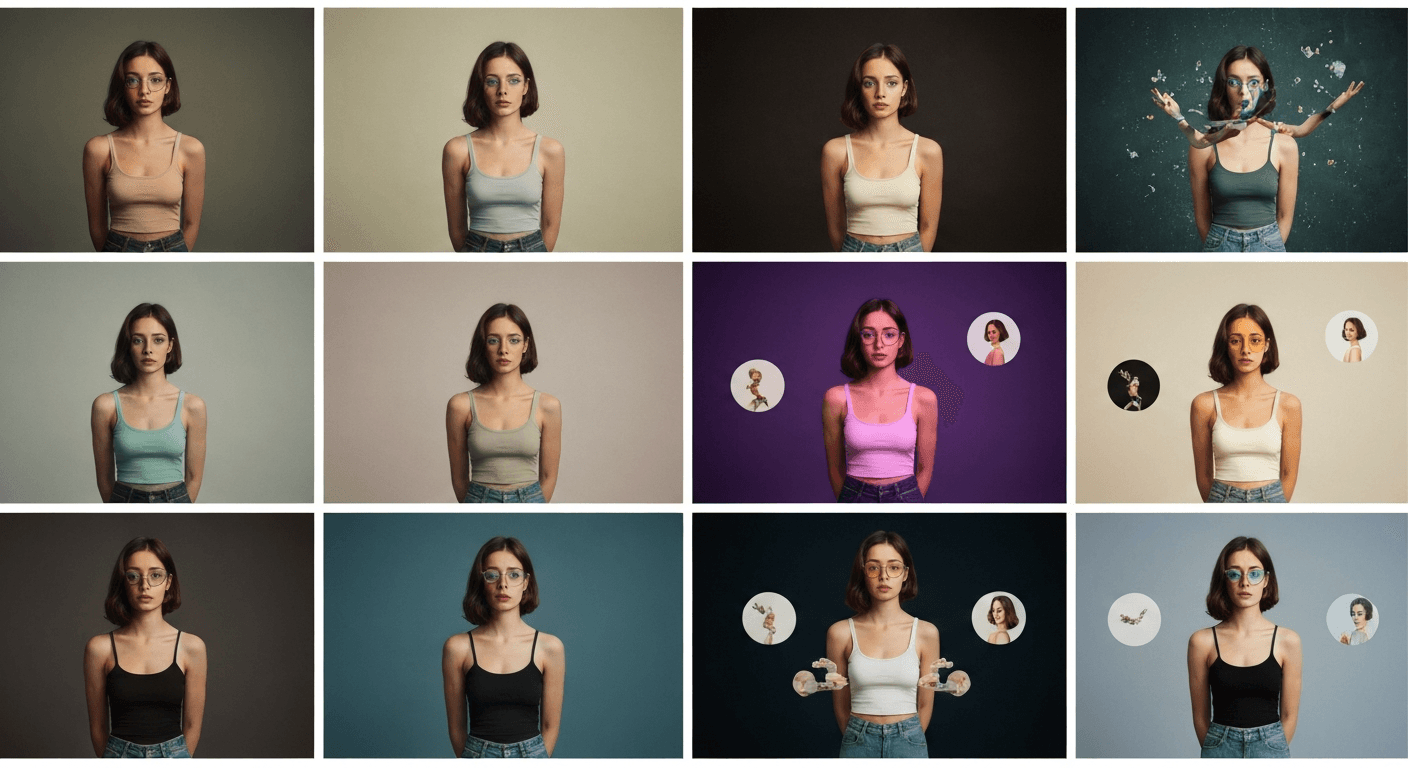
Marketing teams, designers, and creators constantly need the same image in 10 different versions: different backgrounds, colors, moods, and styles for A/B testing, platform sizing, and campaign variation. Seedream 5.0 Edit generates each variation for $0.10 - so a 10-variant set costs about a dollar and takes under two minutes.
TL;DR
- Generate unlimited variations from one source image with text prompts
- 1 credit ($0.10) per variation, 5–15 seconds each
- Perfect for A/B testing, campaign assets, and creative exploration
- 10 variations = $1 total vs $50–$500 from a designer
- 10 free credits at arteza.ai
Why Variations Matter
One image rarely works across every channel and audience. You need:
- Square for Instagram, wide for web banner, vertical for Stories
- Summer version and winter version for seasonal campaigns
- Light mood and dark mood for A/B testing
- English and localized backgrounds for different markets
- Budget version and premium version for different segments
Historically, producing variations meant reshooting, rehiring a designer, or hours in Photoshop. Seedream 5.0 Edit makes each variant a single prompt.
Edit your first photo with AI
No Photoshop skills needed. Just type what you want changed. $0.10 per edit.
Try Seedream 5.0 Edit Free5 libreng henerasyon · Walang credit card na kailangan
The Variation Types
1. Color Variations
Test different color palettes without reshooting:
"Change dominant color palette to warm autumn tones"
"Apply cool blue-and-teal color scheme"
"Muted pastel palette with soft pinks and creams"
"Bold high-contrast primary colors"
Use case: seasonal campaigns, brand exploration, A/B testing CTR.
2. Background Variations
Same subject, different worlds:
"Studio white seamless background"
"Urban rooftop at golden hour"
"Lush tropical jungle"
"Minimalist concrete wall"
"Cozy coffee shop interior"
Use case: audience segmentation - lifestyle shots for different demographics.
3. Mood Variations
Same composition, different emotional tones:
"Bright, airy, optimistic mood with soft daylight"
"Moody cinematic atmosphere with deep shadows"
"Vintage film look with warm fade"
"High-energy saturated pop aesthetic"
Use case: testing which mood drives the most engagement.
4. Style Variations
Same image in different artistic styles:
"Photorealistic (original)"
"Watercolor illustration"
"Oil painting"
"Minimalist line drawing"
"Anime illustration"
Use case: brand exploration, creative concepting, multi-channel consistency. See the style transfer guide.
5. Seasonal Variations
One shoot, four seasons:
"Spring version: blooming flowers, fresh green grass, soft warm light"
"Summer version: sunny, saturated, clear blue sky"
"Autumn version: orange leaves, golden light, cozy warmth"
"Winter version: snow, bare trees, cool blue tones"
Full walkthrough in the seasons tutorial.

Want results like this? Try Seedream 5.0 Edit free →
Real-World Variation Workflows
A/B Testing Ad Creative
Your baseline: one product photo. You need 6 variants for Meta ads testing.
Variant 1: "Warm sunset background, golden-hour lighting"
Variant 2: "Clean white studio, bright professional light"
Variant 3: "Urban cafe lifestyle background"
Variant 4: "Moody dark background with dramatic side light"
Variant 5: "Outdoor garden setting, natural sunlight"
Variant 6: "Minimalist pastel pink background"
Cost: 6 x 1 credit = 6 credits = $0.60 Time: ~90 seconds Previous cost: ~$300 from a designer, 2-day turnaround
Multi-Platform Campaign Kit
One hero image, reformatted for every channel:
Instagram Feed: "Square composition, bright summer colors"
Instagram Stories: "Vertical composition, minimal text space at top"
LinkedIn: "Professional muted tones, corporate aesthetic"
TikTok: "Vertical, high-energy saturated colors"
Email header: "Wide horizontal composition, calm palette"
Cost: 5 x 1 = 5 credits = $0.50
Seasonal Campaign Planning
One product, twelve monthly ad variants:
Jan: "Winter snow background, cool blue tones"
Feb: "Romantic pink Valentine's mood"
Mar: "Spring bloom, fresh green palette"
...and so on
Cost: 12 x 1 = 12 credits = $1.20 for a full year of seasonal ad creative.
The Variation Prompt Framework
Build your variations with a consistent base:
[Preserve instruction] + [specific variant change]
Example:
Base: "Preserve subject and composition, change only..."

V1: "...background to warm sunset beach"
V2: "...background to modern office interior"
V3: "...background to outdoor garden"
This keeps variations comparable - you're isolating one variable at a time, which is what A/B testing actually requires.
Chaining Variations for Compound Testing
Test two variables at once by chaining:
Pass 1: "Change background to studio white"
Pass 2 (on result): "Apply warm golden color grade"
Now run Pass 2 alternatives on the same Pass 1 output:
"Apply warm golden color grade""Apply cool blue color grade""Apply vintage film color grade"
You get a 2x3 matrix of 6 variations from one starting image for 4 credits ($0.40).
Test 20 variants for the price of a coffee
Stop agonizing over which creative to ship. Generate every variation in plain English and let the data decide.
Generate Your First Variants FreeCost vs Traditional Variation Production
| Method | 10 variations | Time |
|---|---|---|
| Seedream 5.0 Edit | $1 | ~2 minutes |
| Freelance designer | $200–$1,000 | 2–7 days |
| Internal design team | Salary cost | Hours |
| Stock image purchases | $100–$500 | Searching + licensing |
The economics allow experimentation that used to be impossible. You can afford to test 20 variants instead of agonizing over 2.
Tips for Better Variations
- Start with a strong source image - variations inherit quality
- Keep prompts parallel - change one variable at a time
- Batch-generate - run 5–10 in one session for easier comparison
- Name and label - track which prompt produced which result
- Iterate the winners - run a second pass on the top-performing variant
Pricing
| Pack | Credits | Price | Variations |
|---|---|---|---|
| Starter | 60 | $5 | 60 |
| Creator | 300 | $25 | 300 |
| Pro | 700 | $50 | 700 |
| Studio | 1,800 | $120 | 1,800 |
Monthly credits refresh each billing cycle. Top-up credits never expire. Full pricing.
Next Steps
- Style transfer techniques
- Background replacement
- Social media editing workflows
- API for batch variations
Generate your first variation set → - 10 free credits on signup.
Subukan ang Seedream 5.0 Edit - Ngayon Na!
Mag-upload ng iyong larawan sa create page para makapagsimulang mag-edit.
5 libreng henerasyon · Walang credit card na kailangan