How to Change Seasons in Photos with Seedream 5.0 Edit
Transform any outdoor photo from one season to another with Seedream 5.0 Edit. Learn to create spring, summer, autumn, and winter versions of your images using AI.
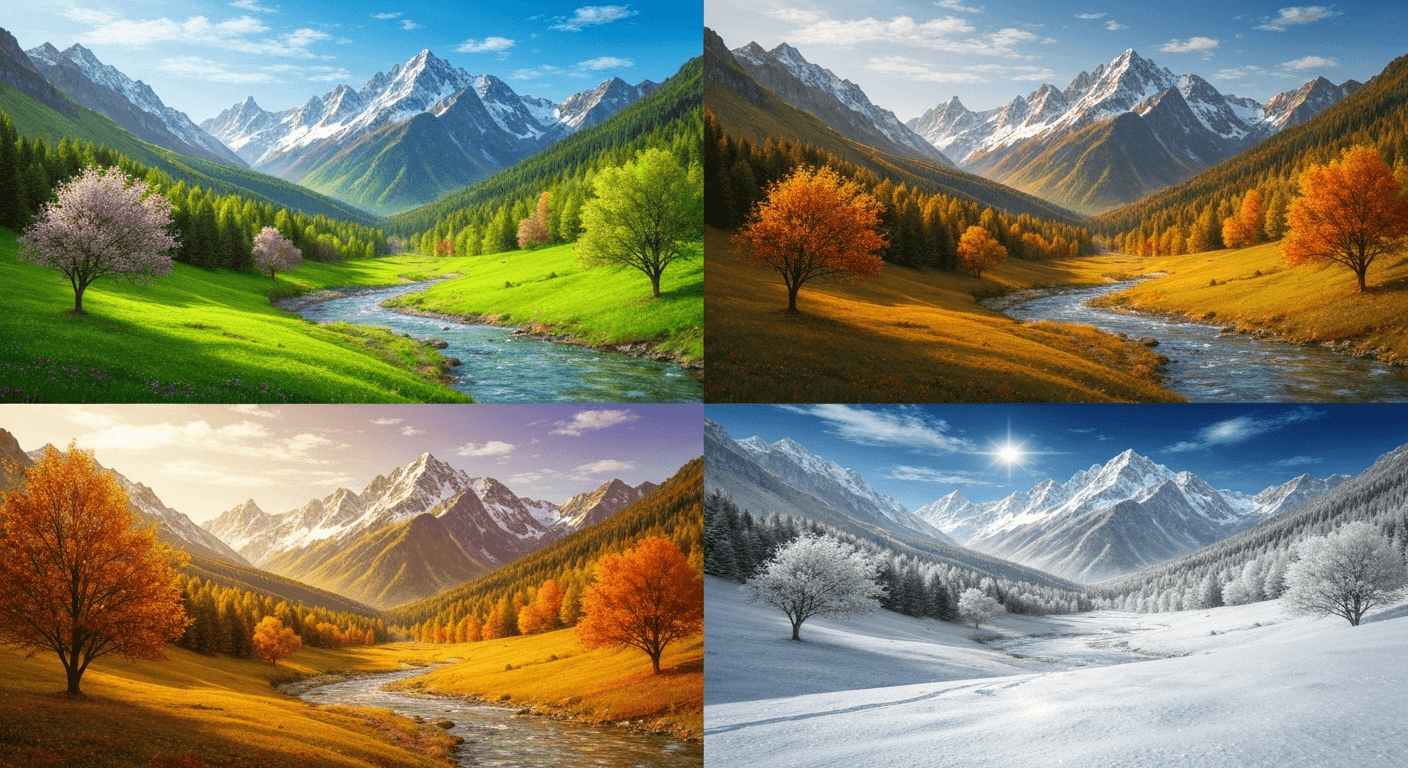
Shoot once, publish for every season. Seedream 5.0 Edit turns a summer photo into a snowy winter scene, a grey autumn shot into a spring bloom, in 10 seconds for $0.10. For marketing teams, real estate agents, travel brands, and content creators, this single capability can replace an entire year of reshoots.
TL;DR
- Transform any outdoor photo into any other season with a single prompt
- 1 credit ($0.10) per season change, 5–15 seconds
- One source photo = four seasonal versions for $0.40 total
- Works on landscapes, real estate, travel, and lifestyle photos
- 10 free credits at arteza.ai
Why Season Swaps Are a Superpower
A real estate agent photographs a house on a rainy November day. The listing goes live in January. Should it look like winter? Sunny spring? Both - for different buyer segments. Seedream 5.0 Edit makes all three versions in under a minute.
A travel brand needs social content year-round but only shot the destination in summer. Now they have autumn posts, winter posts, and spring posts from the same footage.
A landscape photographer wants to sell the same scene to calendar publishers for each month. One image. Twelve variations.
Edit your first photo with AI
No Photoshop skills needed. Just type what you want changed. $0.10 per edit.
Try Seedream 5.0 Edit Free5 penjanaan percuma · Tiada kad kredit diperlukan
The Four Core Season Prompts
Spring
"Transform to spring: blooming flowers, fresh green grass, soft warm daylight, cherry blossoms where appropriate, clear blue sky with scattered white clouds"
Summer
"Transform to summer: lush deep green foliage, bright saturated colors, golden sunny light, clear blue sky, warm atmosphere"
Autumn / Fall
"Transform to autumn: orange, red, and gold leaves, warm amber afternoon light, cozy fall atmosphere, subtle haze, fallen leaves on the ground"
Winter
"Transform to winter: snow covering the ground and rooftops, bare trees, cool blue tones, soft overcast light, snowflakes in the air, frosted edges"
These four are your starting points. Copy them, paste them, tweak them.
Going Beyond Basic Season Swaps
Time of Day + Season
Combine season with lighting for a specific mood:
"Autumn golden hour: warm orange light, fall leaves glowing, long shadows, cinematic warm grade"
"Winter blue hour: snow-covered scene, soft blue twilight, warm window lights, frosty atmosphere"
"Spring morning: fresh blossoms, soft misty light, dewy grass, pastel tones"
"Summer midday: bright sunny light, saturated colors, clear blue sky, vivid greens"
Weather + Season
Add atmospheric elements:
"Winter scene with gentle snowfall, everything covered in fresh snow"
"Autumn scene with morning fog drifting through golden trees"
"Spring scene with light rain shower, wet streets reflecting bloom colors"
"Summer scene with heat haze, dry grass, sun-bleached colors"
Regional Season Variants
Not all springs look the same. Specify:
"Japanese spring: cherry blossoms in full bloom, pink petals, traditional warm light"
"New England autumn: vibrant red and orange maples, crisp air, cool shadows"
"Alpine winter: heavy deep snow, evergreen trees, dramatic mountain light"
"Mediterranean summer: warm golden light, sun-bleached buildings, deep blue sky"

Want results like this? Try Seedream 5.0 Edit free →
Use Case: Real Estate Listings
Starting image: House exterior, grey overcast day.
Edit 1 - Summer: "Transform to bright summer day: lush green lawn, full foliage, clear blue sky, warm golden afternoon light"
Edit 2 - Autumn: "Transform to warm autumn: gold and red foliage, soft amber light, clear sky"
Edit 3 - Spring: "Transform to spring: fresh green lawn, blooming flowers, soft morning light, clear sky"
Cost: 3 credits = $0.30 for three seasonal listing variants.
Full real estate workflow in the virtual staging guide.
Use Case: Travel Brand Content
Starting image: One mountain landscape shot in summer.
Generate a full year of content:
Jan: "Winter scene: deep snow, frozen lake, bare trees, cool blue tones"
Mar: "Early spring: melting snow, fresh green shoots, soft light"
May: "Late spring: full bloom, wildflowers, warm sunny light"
Jul: "Peak summer: lush green, clear blue sky, golden hour"
Sep: "Early autumn: first yellow leaves, warm amber light"
Nov: "Late autumn: bare trees, fallen leaves, moody atmosphere"
12 months of content. 6 variants. 6 credits = $0.60. One shoot, a year of posts.
One shoot. Every season. Pennies.
Skip the four reshoots. Type the season you need - cherry blossoms, fall leaves, snow - and ship it in 10 seconds.
Swap Your First Season FreeUse Case: Wedding Photographers
A wedding photographer shot an outdoor ceremony in summer. Clients ask for a "winter version" for a Christmas card. Instead of telling them no:
"Transform scene to winter: gentle snowfall, snow on the ground, bare trees in background, cool blue light, preserve the couple and their clothing exactly"
Cost: $0.10. Delivered same-day. Happy client.
Use Case: Stock / Commercial
Sell the same landscape to calendar, greeting card, and editorial markets - each needs different seasons. Generate all four from one source.
Subject-Specific Tips
Houses & Buildings
- Keep the structure: add "preserve the building exactly, change only environment"
- Match window lighting to season: warm lights for winter, bright daylight for summer
Landscapes
- Name specific vegetation: "oak trees", "pine forest", "wildflowers"
- Include ground detail: "fallen leaves", "fresh snow", "dry grass"
People in Scenes
- Preserve the subject: add "keep subject and clothing unchanged"
- Be careful with season-clothing mismatches: a person in shorts in a snow scene looks wrong
Urban Scenes
- Add seasonal elements: holiday decorations for winter, outdoor cafes for summer
- Consider the mood: winter cities feel quieter, summer cities feel busier
Preservation Prompts (Important)
The key to good season swaps is telling the model what NOT to change:
"Transform to winter: add snow, bare trees, cool light, BUT preserve all people, buildings, and subject composition exactly"
Without this, the model may over-modify and change elements you wanted to keep.
Common Mistakes
| Mistake | Fix |
|---|---|
| Too subtle | Use stronger language: "transform", "fully change" |
| Too much change | Add "preserve [what]" to the prompt |
| Wrong season feel | Add lighting descriptors (golden-hour, overcast, etc.) |
| Anachronistic elements | Specify regional variant (Japanese, New England, etc.) |
| Weird lighting on subjects | Add "match subject lighting to new scene" |
Full Year Variation Cost Breakdown
Producing seasonal marketing content the traditional way vs Seedream 5.0 Edit:
| Method | 4 seasonal variants |
|---|---|
| Reshoot each season | Thousands of dollars + 12 months |
| Hire illustrator | $500–$2,000 |
| Stock photo licenses | $40–$200 |
| Seedream 5.0 Edit | $0.40 |
Pricing
| Pack | Credits | Price | Seasonal Swaps |
|---|---|---|---|
| Starter | 60 | $5 | 60 |
| Creator | 300 | $25 | 300 |
| Pro | 700 | $50 | 700 |
| Studio | 1,800 | $120 | 1,800 |
Monthly credits refresh each billing cycle. Top-up credits never expire. See pricing.
Next Steps
Swap your first season free → - 10 credits on signup.
Cuba Seedream 5.0 Edit - Sekarang
Muat naik imej anda pada halaman cipta untuk bermula menyunting.
5 penjanaan percuma · Tiada kad kredit diperlukan