Made with this app
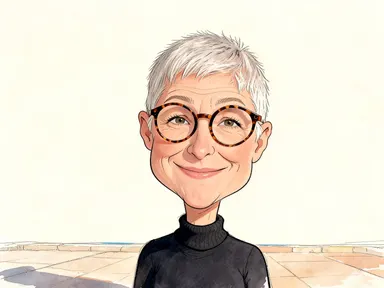
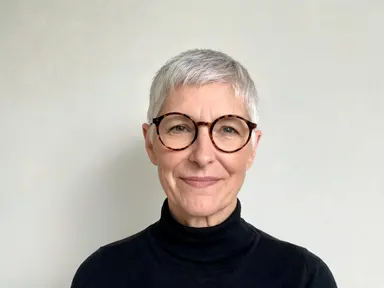
AI Caricature Generator takes a single photograph of a person and turns it into a caricature that keeps their face unmistakably their own while pushing whatever is most distinctive further than life. You choose one of eight drawing traditions from the library, add an optional detail in the text box, and the app handles the rest. It is built for anyone who wants a personalised, affectionate caricature of themselves, a friend, a colleague or a public figure, without touching a drawing tool.
How to use this app
- 1
Upload your file. There is no prompt you have to write.
- 2
Pick a look from the visual library, add a note of your own if you want one, then press Generate.
- 3
Watch your result appear in the gallery within moments.
- 4
Download, share, or generate again with a new idea.
What you can make
Personalised gifts and cards
A caricature of someone's face makes a gift feel handmade and specific. Choose "Seaside watercolour" for a warm, sunny result that prints well on card stock, or "3D cartoon" for something a child would love. The likeness is strong enough that the recipient will know immediately who it is.
Editorial and satire projects
Journalists, bloggers and newsletter writers who need a pointed illustration of a public figure can choose "Newspaper ink" for the confident cross hatched line work and enlarged head that editorial caricature has used for centuries. The result carries the visual authority of a printed broadsheet.
Social media profile images
A caricature avatar stands out in a feed of cropped headshots. "Pop art" and "Comic book" both produce bold, high contrast images that read clearly at small sizes, while "3D cartoon" produces a glossy, polished result that works equally well at full size or as a thumbnail.
Event programmes and name badges
Conference speakers, theatre cast lists and office directories become more memorable with a caricature beside each name. "Graphite portrait" keeps the exaggeration restrained enough to remain professional, while still being more interesting than a standard headshot.
Tribute and retirement presentations
A slide deck honouring a colleague's long career lands better with a caricature than a formal portrait. "Vintage toon" or "Clay figure" both read as affectionate rather than critical, which is exactly the tone a tribute calls for.
Shots to try
Tips for better results
Start with a clear front facing photo
The app exaggerates what is already distinctive in the face, so it needs to see the face clearly. A sharp, well lit photograph from the front, showing the face from the shoulders up, gives the strongest likeness. A blurred, small or side-on photo gives the exaggeration less to work with.
Match the library choice to the occasion
"Graphite portrait" is the mildest tile and suits professional or sensitive contexts. "Newspaper ink" pushes the features hardest and suits editorial or satirical uses. Knowing the range helps you pick the right level of exaggeration before you generate.
Use the text box for one specific detail
The library choice sets the style and the level of exaggeration. The optional text box is most useful for a single precise detail: keeping a distinctive beard, leaving out a background element, or noting a particular expression. One clear instruction works better than several.
Check the result before you share it
A caricature is not a flattering portrait. The point of the form is to push what is most distinctive further than life. If you are making one of someone else, look at it before you send it. Try "Graphite portrait" or "Seaside watercolour" if you want the warmest, most restrained result.
When to choose this app
AI Caricature Generator is the right choice when the subject is a single person's face and the goal is a stylised, personality driven image rather than a faithful record of a real place or object. AI Room Converter works on rooms and interiors, mapping new functions onto existing architecture. AI Sky Replacement reworks the atmosphere of an outdoor scene by changing what is above the horizon. Neither of those tools has anything to do with portraiture. If the job is to produce an illustration that is unmistakably one specific person, with their features pushed into a chosen drawing tradition, this is the app for it.
Frequently asked questions
Does the caricature keep the person's actual face, or does it invent new features?
The app keeps the subject's own face shape, eyes, nose, mouth, jaw, skin tone, hair colour and hairstyle. It exaggerates what is already there rather than inventing anything new. Glasses or facial hair are kept only if they appear in the uploaded photograph.
Can I get a caricature of two people from one upload?
No. The app draws one person from one photograph. If you want caricatures of two people, you would generate them separately from individual photographs. It does not composite two figures into a single image.
Will there be any text, a name or a signature on the result?
No. The app produces caricatures with no writing of any kind: no caption, no name, no signature and no watermark. If you need a name or caption added, that would need to be done in a separate image editor after you download the result.
How do the eight library tiles differ from one another?
Each tile sets a different drawing tradition and a different level of exaggeration. "Graphite portrait" is the most restrained, with subtle enlargement and careful shading. "Newspaper ink" is the most forceful, with heavy cross hatching and the strongest feature pushed hardest. The others sit across that range in distinct visual styles.
What happens if I upload a photograph taken from the side or at an angle?
The app works from whatever face information is visible, but a sharp front facing photograph gives the strongest likeness and gives the exaggeration the most to hold on to. A heavily angled, blurred or very small face in the photo will produce a weaker result.
Is the optional text box for writing a full description of the caricature I want?
No. The library choice sets the style and the level of exaggeration. The text box is for one small additional detail: a specific expression, a feature to keep or something to leave out. The app works perfectly well without it, and a short, precise note works better than a long description.
How much does it cost?
Each generation costs 1 credit. New accounts get free credits to try it out.
Do I need any editing skills?
No. Upload your photo, pick the look you want from the library, and the app writes the full instruction for you behind the scenes. There is nothing to install and nothing to configure. A small optional box lets you add one line in your own words, but the app works without it.
Can I use the results commercially?
Yes. Content you generate is yours to use, subject to our content licenses.
How long does a generation take?
Most generations finish in under a minute, and you can watch progress live in the gallery.