Made with this app
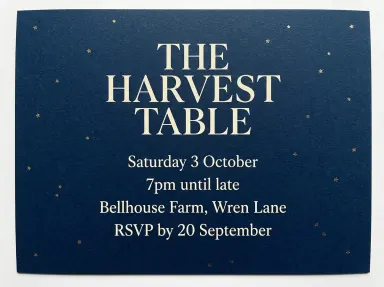
AI Invitation Generator turns a heading and a handful of event details into a finished printed invitation card, with every line drawn exactly as you typed it. Pick the card style from the library, type your heading and your details, and the app sets them in place. It suits anyone who needs a real invitation with accurate dates, names and addresses, whether for a wedding, a birthday, a gallery opening or a corporate dinner.
How to use this app
- 1
Upload your file. There is no prompt you have to write.
- 2
Pick a look from the visual library, add a note of your own if you want one, then press Generate.
- 3
Watch your result appear in the gallery within moments.
- 4
Download, share, or generate again with a new idea.
What you can make
Wedding invitations in minutes
Type the couple's names as the heading, then add the date, ceremony time, venue and RSVP line each on its own line. Pick "Gold foil" for a warm metallic finish on deep ivory, and the card comes back with every detail set exactly as written, ready to share or print.
Corporate event announcements
A product launch or client dinner needs a card that reads as polished and precise. Type the event name across the top, add the four logistical lines below, and choose "Modern minimal" for a clean grotesque sans on a warm neutral ground that signals professionalism without decoration.
Children's party invitations
Type the birthday child's name and age as the heading, then list the party date, start time, address and RSVP contact below. "Terrazzo" wraps the plain white panel in bright confetti speckle with rounded friendly type, giving the card exactly the energy a seven-year-old's party calls for.
Intimate dinner party cards
A small supper for eight guests deserves something quieter than a printed flyer. "Pressed linen" sets the event title in soft charcoal on natural woven stock, with a pressed dried flower in one corner, making the occasion feel considered and personal before anyone opens the door.
Multilingual invitations
The app draws accurately across a wide range of alphabets, including accented Latin letters, Chinese, Japanese, Korean, Arabic, Hebrew, Russian and more. Type the heading and details in your guests' language and the characters come back character for character correct, with no special setup required.
Shots to try
Tips for better results
One detail per line
The app draws each line you type on its own line, in the order you give them. Put the date on one line, the time on the next, then the venue, then the RSVP. Mixing two facts onto one line means they share a line on the finished card, so keep them separate from the start.
Read everything before you commit
A card drawn slightly off is a visual problem; a date drawn slightly off sends guests to the wrong evening. The lines come back exactly as typed every time, and it still costs nothing to read the heading and every detail once more before you generate.
Match the tile to the occasion's tone
No tile names an occasion, so the choice is yours. "Letterpress" and "Gold foil" read as formal; "Terrazzo" and "Watercolour botanical" read as warm and relaxed; "Modern minimal" reads as contemporary. Pick the surface that matches the mood you want guests to arrive with.
Use diacritics and non-Latin alphabets freely
The app has been tested across twelve alphabets and returns every character exactly as typed, diacritics included. Type accented letters, Arabic, Hebrew, Chinese, Japanese, Korean, Thai, Hindi, Bengali, Russian or Ukrainian with confidence. If you are using an alphabet not in that list, check the result carefully.
When to choose this app
AI Invitation Generator is the right choice when you need a card that carries exact facts, not feelings. AI Greeting Card picks the occasion and draws the greeting and a name into the artwork, which is the right tool when the emotional message is the whole point. AI Book Cover takes a title and a look and returns a front cover designed for a reading audience. Neither is built to hold a date, a time, a venue and an RSVP line as separate, precisely drawn elements the way this app is. If your reader needs to arrive somewhere at a specific time, use this one.
Frequently asked questions
How many lines of detail can I include on the card?
The app has been tested at four separate detail lines and held each one exactly, across two different card styles. Keeping each fact, date, time, venue and reply-by on its own line is the approach that works. Very long blocks of text will crowd the card, so concise lines serve both accuracy and appearance.
Can I write the heading and details in a language other than English?
Yes. The app has been tested and confirmed accurate across twelve alphabets: ordinary Latin letters with diacritics, Chinese, Japanese, Korean, Thai, Arabic, Hebrew, Hindi, Bengali, Russian and Ukrainian. If your language uses an alphabet outside that tested set, review the result carefully before sharing it.
Does the card style I pick affect how the text is set?
Yes, each tile specifies its own typeface and layout. "Letterpress" uses a classical serif pressed into the surface. "Modern minimal" uses a clean grotesque sans ranged left. "Art deco" uses tall narrow capitals. The heading and detail text you type is always drawn, but the hand it is drawn in changes with the tile.
Will the app add any extra text, logos or decorations I did not type?
No. The app draws only what you type: the heading you set and the detail lines you provide, in that order, with nothing added. No tagline, no website address, no watermark and no extra decoration appears on the card beyond what the tile itself specifies as its background design.
Is this app suited to making flyers or posters for a public event?
It is designed for invitation cards aimed at specific guests, not at strangers passing by. The format is a close-held card seen straight on, with a heading and a few lines of detail. If the goal is to reach a broad audience with a bold visual announcement, a different format is a better fit for that job.
Can I get a card that shows an envelope, a hand holding it or a table setting around it?
No. The app draws the card itself filling the frame, seen straight on. No envelope, no hand, no table and no mockup context appears around it. What you receive is the card face, which you can place into any context you choose after downloading it.
Do I need any editing skills?
No. Upload your photo, pick the look you want from the library, and the app writes the full instruction for you behind the scenes. There is nothing to install and nothing to configure. A small optional box lets you add one line in your own words, but the app works without it.
Can I use the results commercially?
Yes. Content you generate is yours to use, subject to our content licenses.
How long does a generation take?
Most generations finish in under a minute, and you can watch progress live in the gallery.