Made with this app
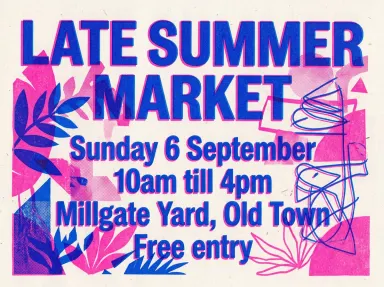
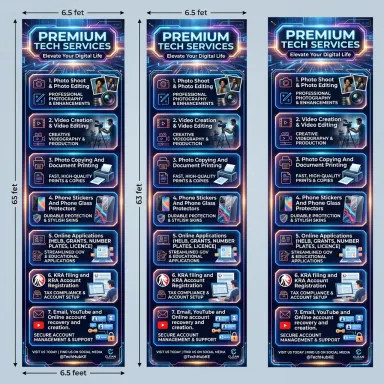
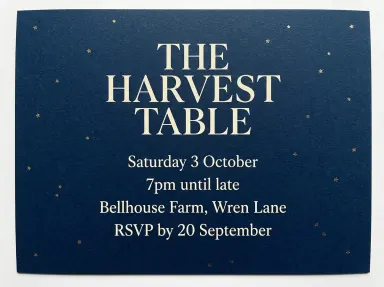
AI Flyer Generator turns a headline and a few lines of details into a finished printed flyer, drawn at high resolution and ready to share. Type what the event is, add the facts you want on the page, choose a print style from the library, and the app paints every word into the artwork exactly as you typed it. It is built for anyone who needs a sharp, complete flyer fast: promoters, organisers, small venues, community groups and independent makers.
How to use this app
- 1
Upload your file. There is no prompt you have to write.
- 2
Pick a look from the visual library, add a note of your own if you want one, then press Generate.
- 3
Watch your result appear in the gallery within moments.
- 4
Download, share, or generate again with a new idea.
What you can make
Club night promotion
Type the night's name as the headline and put the date, venue and door time on separate lines in the details box. Choose "Club neon" and the app sets glowing type over a dark gradient with saturated magenta and cyan light, producing a flyer that reads well scaled down to a social-media story.
Community market announcement
A neighbourhood market needs something warm and approachable. Type the market name, then the date, location and hours on their own lines. "Botanical" wraps the whole thing in pressed leaf and wildflower illustrations on warm off-white paper, matching the mood without any design work on your part.
Independent gig or show
Type the band or performer name as the headline, then add the venue, date and support act on separate lines. "Newsprint" renders it as a high-contrast one-colour print on grey pulp paper with heavy rules and visible print noise, giving it the same raw energy as a stapled telephone-pole flyer.
Academic or arts lecture
Type the talk title and put the speaker, institution and room number on individual lines. "Swiss grid" sets everything on a clean neutral sans serif with generous white space and one accent colour, producing a poster that reads as considered and authoritative without looking over-designed.
Zine launch or indie fair
Type the event name, then the date and location on separate lines. "Zine collage" assembles the result with torn paper edges, photocopied halftones and mismatched typefaces taped at angles, giving it an aesthetic that fits the culture of independent publishing without manual cutting or scanning.
Shots to try
Tips for better results
One fact per line
Put each piece of information on its own line in the details box: date, then location, then time. The app draws each line separately and in order, so keeping them short and distinct stops them running together and makes the flyer scannable at a glance.
Match the tile to the audience
"Club neon" and "Newsprint" read fast across a dark room or a cluttered wall. "Swiss grid" and "Botanical" reward closer reading. Think about where the flyer will be seen and by whom before you choose, because the tile sets the entire visual register of the result.
Capitalise intentionally in the headline
The app paints the headline exactly as you type it, case and all. ALL CAPS gives a shout; title case gives a name. Decide before you type because the output cannot be retyped afterwards without generating again.
Keep the details box tight
Four short lines of around twenty characters each have been confirmed to hold perfectly. If you need to include more information, consider what a stranger actually needs to show up and cut the rest. A flyer that tries to say everything is harder to read than one that says the right things.
When to choose this app
AI Flyer Generator is the right choice when you need broadcast artwork that carries words across a room and works at social-media scale. AI Greeting Card picks the occasion and draws the greeting into card artwork designed to be handed to one person. AI Book Cover turns a title and a look into a finished front cover shaped for a bookshelf. Neither of those is built for public announcement. This app is, with eight distinct print styles covering everything from club-night neon to soft botanical, all set around the exact text you provide.
Frequently asked questions
How many lines of detail can I include on the flyer?
Four short lines of around twenty characters each have been confirmed to hold exactly as typed, in order, each on its own line. You can include a fifth line, but the more text the app has to fit, the harder the layout becomes. Keeping each line brief and essential gives the clearest result.
Can I set the flyer in a language other than English?
Yes. The app has been confirmed to draw Latin, accented Latin, Chinese, Japanese, Korean, Thai, Arabic, Hebrew, Hindi, Bengali, Russian and Ukrainian character for character correctly, punctuation included. If you are working in an alphabet not on that list, the app will warn you before anything is spent, because untested is not the same as safe.
What happens if I make a typo in the headline or details?
The app draws exactly what you type, so a typo in the input becomes a typo in the artwork. Because the words are painted into the picture, they cannot be corrected afterwards. Check your text carefully before generating. If you spot an error in the result, correct the input and generate again.
Can I choose a specific font or typeface for my flyer?
No. The typeface is determined entirely by the library tile you choose. "Newsprint" uses heavy condensed capitals; "Swiss grid" uses a clean neutral sans serif; "Letterpress bill" uses fat wood type. The tile controls the whole typographic register, and no individual font can be requested.
Which tile should I use if I want the flyer to look handmade or photocopied?
"Zine collage" gives torn paper edges, photocopied halftones and mismatched typefaces taped at angles. "Risograph" gives two-colour fluorescent inks slightly misregistered on off-white paper with visible grain. Both read as hand-produced. The difference is that "Risograph" is more structured; "Zine collage" is more chaotic.
Do I need any editing skills?
No. Upload your photo, pick the look you want from the library, and the app writes the full instruction for you behind the scenes. There is nothing to install and nothing to configure. A small optional box lets you add one line in your own words, but the app works without it.
Can I use the results commercially?
Yes. Content you generate is yours to use, subject to our content licenses.
How long does a generation take?
Most generations finish in under a minute, and you can watch progress live in the gallery.