Made with this app
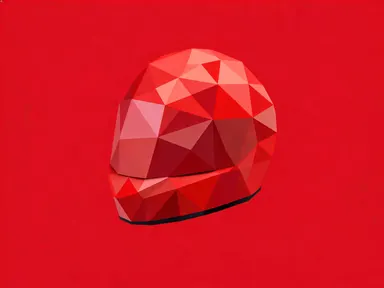
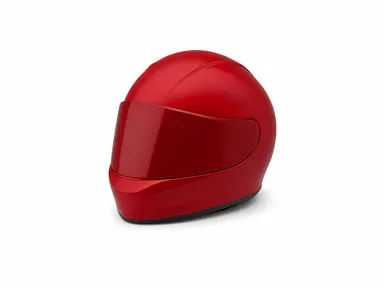
AI Polygonal Generator takes a photograph you upload and rebuilds its subject out of flat geometric facets, keeping the original silhouette, proportions and angle exactly while replacing the surface with the style you pick from eight library tiles. It is built for product photographers, designers, illustrators and brand teams who need a striking geometric version of an object, creature or portrait without touching a 3D application. Upload a clear, well-lit photo, choose a tile, and the app handles the rest.
How to use this app
- 1
Upload your file. There is no prompt you have to write.
- 2
Pick a look from the visual library, add a note of your own if you want one, then press Generate.
- 3
Watch your result appear in the gallery within moments.
- 4
Download, share, or generate again with a new idea.
What you can make
Product hero images
A bottle, sneaker or gadget with a strong outline becomes a geometric art piece under 'Faceted metal' or 'Low poly', ready to anchor a campaign visual. The plain studio background the app generates keeps the subject isolated and print-ready without any further masking work.
Animal and wildlife portraits
A bear, wolf or eagle photographed with the subject filling the frame comes back as a bold decorative piece under 'Stained glass' or 'Gradient polygons'. The strong silhouette of most animals translates cleanly into faceted geometry, making results well suited to poster or wall art printing.
Architectural and vehicle close-ups
Cars, motorcycles and building facades have angular forms that survive faceting especially well. 'Crystal' or 'Wireframe' picks reveal the underlying geometry of the subject in a way that feels intentional rather than simplified, useful for automotive editorial or architecture portfolios.
Character and portrait art
A head-and-shoulders portrait or a strong profile shot converts into a geometric study under 'Folded paper' or 'Stone mosaic'. These tiles suit editorial illustration, album artwork and social media identity graphics where a human likeness needs to feel designed rather than photographed.
Logo-free brand object art
A perfume bottle, a piece of jewellery or a ceramic object can be turned into a geometric keepsake image for brand decks and lookbooks. Because the app removes readable text, results work as impressionistic product art rather than literal product shots, standing out in presentation contexts.
Shots to try
Tips for better results
Fill the frame with one subject
The app is designed for a single subject that occupies most of the frame. If the subject is small, distant or surrounded by busy detail, the faceting has less to work with and the result reads as texture rather than a clear geometric form.
Match the tile to the subject's outline
Tiles like 'Wireframe' and 'Crystal' depend on edge contrast to read well, so they suit subjects with crisp, uncluttered silhouettes. 'Gradient polygons' and 'Stone mosaic' are more forgiving with softer or rounder forms such as faces or organic objects.
Use the optional text box for colour, not style
The tile you choose determines the faceting. The small text box below the library is best used to nudge a colour direction, such as asking for warmer tones across the facets, rather than trying to change the surface treatment the tile already defines.
Light the subject cleanly before uploading
Even, clear lighting helps the app read the form and distribute facets accurately. Strong shadows falling across the subject can be misread as edges, pulling the geometry away from the actual outline. A plain background in the original photo gives the clearest input.
When to choose this app
AI Polygonal Generator is the right choice when the goal is a single subject rebuilt as decorative geometric art, kept in its original pose, on a clean isolated ground. It is not the tool for changing a setting or environment: AI Room Converter transforms whole interior spaces, and AI Sky Replacement reworks the lighting across an entire outdoor scene. Choose AI Polygonal Generator when the photograph already has the composition you want and you need the surface itself to become the artwork.
Frequently asked questions
What kinds of photographs work best?
A single well-lit subject filling most of the frame, with a reasonably clear outline, gives the strongest result. Animals, vehicles, bottles, shoes, heads and architectural details all work well. A crowded scene with many overlapping subjects or a very small subject lost in a large background gives a weaker geometric reading.
Will the background from my photograph appear in the result?
No. The app removes the original background and places the rebuilt subject on a plain studio colour drawn from the subject's own palette. The room, street or surface in your photograph will not carry through to the result.
Can I keep text, a label or a logo that appears on my subject?
Text, lettering, numbers and logos are not reproduced as readable elements in the result. The faceting process simplifies fine detail, and the app does not render any writing. If a label is part of what makes the product recognisable, the result will read as an impressionistic version of the object rather than a literal one.
What does the optional text box let me do?
It lets you add one short extra instruction, such as nudging the colours in a warmer or cooler direction or asking the app to emphasise a particular part of the subject. The tile you pick still controls the faceting style; the text box refines rather than replaces that choice, and the app works perfectly without it.
Which image formats can I upload?
The upload well accepts JPG, PNG, WebP and GIF files. Drag your file onto the well or pick it from your device. One clear, well-exposed photograph of a single subject is all the app needs to produce a result.
Can I change the pose or angle of the subject?
No. The app preserves the silhouette, proportions and camera angle exactly as they appear in your photograph. If you want a different pose or viewpoint, photograph the subject from that angle first, then upload that image.
How much does it cost?
Each generation costs 1 credit. New accounts get free credits to try it out.
Do I need any editing skills?
No. Upload your photo, pick the look you want from the library, and the app writes the full instruction for you behind the scenes. There is nothing to install and nothing to configure. A small optional box lets you add one line in your own words, but the app works without it.
Can I use the results commercially?
Yes. Content you generate is yours to use, subject to our content licenses.
How long does a generation take?
Most generations finish in under a minute, and you can watch progress live in the gallery.