هوش مصنوعی تبدیل تصویر به ویدیو
یک عکس ثابت را آپلود کنید و یک کلیپ ویدیویی کوتاه از آن تولید کنید: موضوع، سبک و ترکیببندی در تصویر شما ثابت میماند در حالی که مدل صحنه را متحرک میکند. Arteza بهترین موتورهای تبدیل عکس به ویدیو را میزبانی میکند: Kling، Seedance، MiniMax، Wan و Veo، همه در یک استودیو، بنابراین میتوانید همان فریم را با چندین مدل متحرک کنید و بهترین نتیجه را انتخاب کنید.
تصاویر واقعی، انیمیشنهایی از Arteza
هر گریم از تصویری شروع میشود که آپلود شده است. با حرکت نگریز یا لمس، فیلمی که از آن ساخته شده را ببینید.
 تصویر مبداRunway Gen-4 Turbo 4c
The foam head in the nearest pot swells and climbs the rim in a slow rolling boil, fine bubbles breaking across its surface, and the barista's tongs lift the pot clear of the sand just as the foam crests. Camera pushes in steadily as it rises.
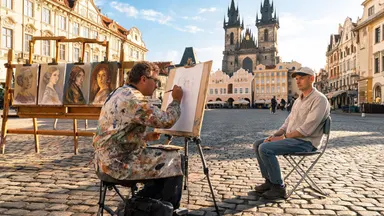 تصویر مبداKling O1 7c
Rack focus pulls slowly from the soft blur of finished canvases in the background to the painter's pencil moving across the sketchpad in sharp foreground detail, the tourist sitting still while the square glows in the background, camera entirely static.
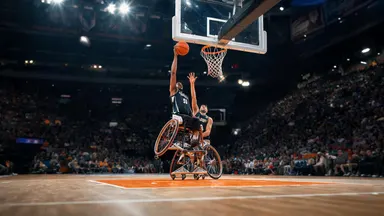 تصویر مبداSeedance 1.0 Pro 4c
Camera tilts slowly down from the peak of the player's jump, following the ball toward the backboard, the player's expression fierce with effort, crowd noise implied by motion blur of waving arms in the packed stands behind.
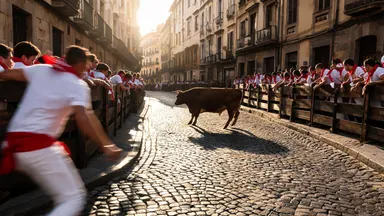 تصویر مبداMidjourney Video 6c
Camera dollies slowly straight back from the action while the steer completes its corner turn, runners peeling away along the barrier, the cobblestone alley widening to reveal the full gauntlet of the street receding behind the retreating lens.
 تصویر مبداWan 2.2 3c
The chart continues to unroll slowly under the archivist's careful hands, revealing an ornate cartouche and inked sea-monster illustrations, the reading lamp flickers slightly, camera dollies backward steadily revealing the full length of the oak table
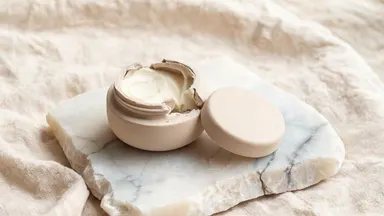 تصویر مبداGrok Video 1.5 2c
Hold the camera static and rack focus slowly from the rough alabaster edge in the foreground to the pale balm surface inside the open pot, the creamy texture sharpening into full detail as the stone edge softens to bokeh.
نحوه عملکرد
عکس خود را آپلود کنید
هر عکس ثابتی را بیاورید: یک عکس، یک عکس محصول، یا چیزی که در استودیو عکس تولید کردهاید. عکسهای تیز، روشنروی با موضوع واضح بهترین حرکت را دارند.
حرکت را توصیف کنید
یک پرامپت کوتاه درباره آنچه باید اتفاق بیفتد بنویسید، نه آنچه قبلاً قابلرؤیت است: یک فشار دوربین آهسته، موی متحرک در باد، یک موضوع که به سمت دوربین میچرخد. یک مدل و مدت زمان انتخاب کنید؛ هزینه اعتبار دقیق قبل از تولید نشان داده میشود.
تولید و تکرار
مدل از عکس شما به عنوان فریم اول استفاده میکند و کلیپ را تولید میکند. اگر حرکت درست نیست، دوباره با یک پرامپت تعدیلشده اجرا کنید یا بدون ترک استودیو به مدل دیگری روی همان عکس تغییر دهید.
مدلهایی که میتوانید همین الان استفاده کنید
هر مدلی که در زیر مشاهده میکنید در Arteza فعال است و هزینه اعتبار فعلی آن، از همان موتور قیمتگذاری که استودیو هنگام تولید استفاده میکند، دریافت شده است.
MiniMax H3 Max
سریعترین ویدیوی مصنوعی با کیفیت بالا، 768P در چند ثانیه
از ۴ اعتبار
پرسشهای متداول
کدام مدل هوش مصنوعی برای تبدیل عکس به ویدیو بهترین است؟
این بستگی به شات دارد. Kling 3.0 Pro یک گزینه سینمایی قوی با صدای بومی است، Seedance 2.0 کنترل فریم انتهایی را برای قاببندی دقیق اضافه میکند، MiniMax H3 Max یک کلیپ را در چند ثانیه برمیگرداند وقتی شما تکرار میکنید، و Wan 2.6 انتخاب ارزان برای کار حجیم است. همه آنها ورودی عکس را در Arteza میپذیرند، بنابراین پاسخ قابلاعتماد این است که عکس خود را از طریق دو یا سه مدل اجرا کنید و مقایسه کنید.
آیا میتوانم کنترل کنم که در ویدیو چه اتفاقی بیفتد؟
بله. عکس کنترل میکند که چیزها چگونه به نظر برسند و پرامپت متنی شما کنترل میکند که چه اتفاقی بیفتد: حرکت دوربین، عمل موضوع، حال و هوا و سرعت. برخی از مدلها، مانند Seedance 2.0، همچنین یک فریم انتهایی را میپذیرند تا بتوانید نحوه پایان شات را مشخص کنید.
کدام عکسها بهترین کار را میکنند؟
عکسهای تیز با یک موضوع واضح، روشنایی خوب و فضای اطراف موضوع. ترکیببندیهای بسیار شلوغ، روکشهای متن سنگین و نزدیکترینها تمایل دارند تحریف شوند، زیرا مدل باید جزئیاتی را اختراع کند که نمیتواند ببیند.
آیا تبدیل عکس به ویدیو رایگان است؟
شما اعتبارات رایگان هنگام ثبتنام دریافت میکنید، که برای تولید و مقایسه کلیپها قبل از تصمیم برای خریدن بیشتر کافی است. هر مدل هزینه اعتبار دقیق خود را قبل از تولید نشان میدهد، بنابراین هیچ شگفتیای وجود ندارد.