Made with this app
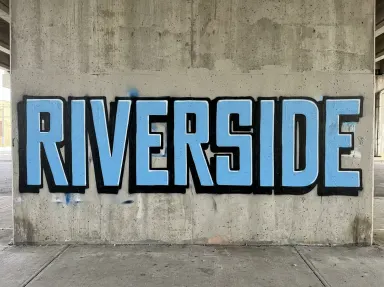
AI Graffiti Generator takes a single word you type and returns it as a spray-painted piece on a wall: brick, concrete or steel, lit by the light of the place, with visible edges, overspray and the occasional drip. You choose the word and pick one of eight painting styles from the library, and the app builds the rest. It is made for designers, streetwear brands, musicians, event promoters and anyone who needs a graffiti render without commissioning a wall or a writer.
How to use this app
- 1
Upload your file. There is no prompt you have to write.
- 2
Pick a look from the visual library, add a note of your own if you want one, then press Generate.
- 3
Watch your result appear in the gallery within moments.
- 4
Download, share, or generate again with a new idea.
What you can make
Streetwear drops and merch mockups
A brand word set in "Chrome and black" gives you a metallic piece ready to place on a hoodie flat-lay or a lookbook page. The invented wall keeps the focus entirely on the letterforms, and the silver fill reads clearly in print and on screen.
Album art and single covers
Musicians naming a release can type the title word and choose "Wildstyle" for cover art that signals credibility to a hip-hop audience. The interlocking arrows and blended fills reward a close look, which suits artwork that lives on a streaming thumbnail.
Event and festival promotion
An event name set in "Blockbuster" reads at a glance even when the image is scaled down to a social card. Wide flat capitals in two solid colours hold legibility at small sizes and reproduce cleanly on both digital and print assets.
Game and film title treatments
A title word rendered in "3D bevel" produces chunky extruded letters with a cast shadow that suits sci-fi, action or urban narratives. The depth and wall texture give it a location feel without requiring a set or a location shoot.
Personal name art and gifts
A person's first name set in "Bubble throw up" makes a fast, warm piece suitable for a birthday card background, a poster or a framed print. Fat rounded letters with a thick outline keep the style approachable and legible for anyone.
Shots to try
Tips for better results
Match the tile to legibility needs
"Blockbuster", "Bubble throw up" and "Stencil" read at a glance every time. "Chrome and black", "Marker tag" and "3D bevel" read easily. "Dripping" takes a little effort. "Wildstyle" is designed not to be decoded at a glance: choose it when visual density matters more than instant readability.
Short words use space well
The app places the whole word inside the frame with bare wall on all sides. A word of four to six characters tends to fill that space with satisfying weight. Longer words work, but each letter gets proportionally smaller, so check that the chosen style still reads at the size you need.
Case affects the result
The app paints the word exactly as you type it, letter for letter, in exactly the case you use. All capitals with "Blockbuster" gives an authoritative read. Mixed case with "Marker tag" can feel more personal and handmade. Try the same word in both cases if the mood is not yet settled.
Non-Latin alphabets render correctly
The app has been tested across Latin, accented, Cyrillic, Arabic, Hebrew, Chinese, Japanese, Korean, Thai, Hindi and Bengali characters. If your word uses one of those scripts, type it with full diacritics or native characters. An alphabet outside that tested set should be tried with caution before committing.
When to choose this app
Choose AI Graffiti Generator when the deliverable is a single word painted on a wall, styled as spray-paint art. AI Logo Maker takes a brand name and returns a clean logo, which is a different output with different visual rules. AI Greeting Card picks an occasion and builds card artwork with words drawn into it, which is a different format and intention entirely. This app is the one when the word itself is the artwork, rendered as a piece in a real place.
Frequently asked questions
Can I put two words or a short phrase on the wall?
The app is built around one word. What you type is painted as a single word on the wall, with bare wall visible on all sides. If you type a phrase with a space, the result is unpredictable. For reliable output, keep the entry to one unbroken word or compound without spaces.
Will the app add a tag, signature or crew name anywhere in the image?
No. The only lettering in the image is the word you type. No tag, signature, date, crew name or any other text appears anywhere in the frame. The wall around the piece is clean.
How do the eight library tiles actually differ from each other?
They describe eight distinct painting techniques: wide flat capitals, fat rounded throw-ups, interlocking wildstyle, stencil-sprayed flat forms, chrome-and-black metallic finish, fat marker handstyle, dripping wet paint and chunky extruded 3D letters. Each tile sends a different set of style instructions, so the same word looks genuinely different under each one.
Can I use this to add my word to a photograph of a specific wall I already have?
No. The app starts from an empty frame and invents the wall, the surface and the setting. It does not take any uploaded image. If you need a word placed onto a photograph you supply, that is a different workflow this app does not support.
Does the result look like the work of a specific real graffiti writer?
No. The app generates an original piece based on the style tile you choose. It does not copy, replicate or reference any existing writer's hand or any documented piece. The wall and the letterforms are invented fresh for each generation.
What resolution does the app deliver?
The app renders at 1K, 2K or 4K resolution. The resolution selector is shown on the page next to the cost for each tier, so you can choose the output size that fits your intended use before generating.
Do I need any editing skills?
No. Upload your photo, pick the look you want from the library, and the app writes the full instruction for you behind the scenes. There is nothing to install and nothing to configure. A small optional box lets you add one line in your own words, but the app works without it.
Can I use the results commercially?
Yes. Content you generate is yours to use, subject to our content licenses.
How long does a generation take?
Most generations finish in under a minute, and you can watch progress live in the gallery.