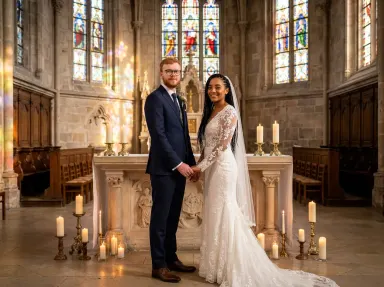
Made with this app
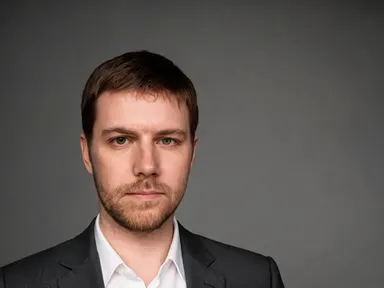

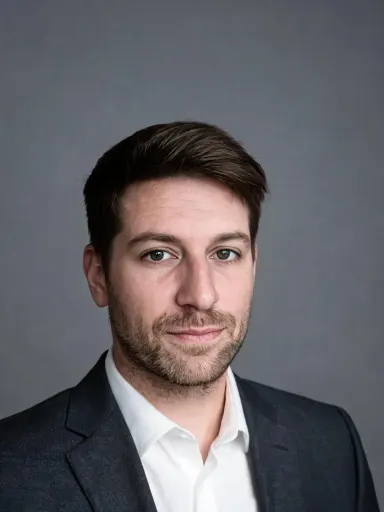
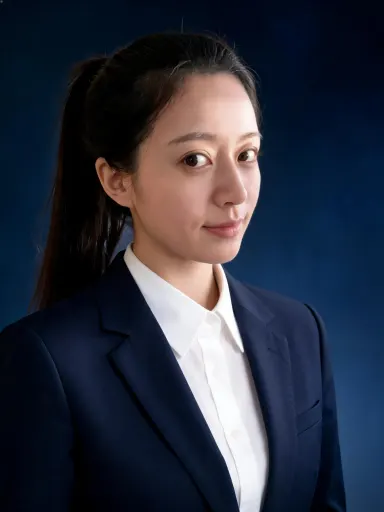
AI Headshot turns a single casual photo into a polished professional portrait. Upload any clear photo of yourself, choose a setting and outfit from the visual library, and the app rebuilds the image around you: new background, new clothes, proper studio or location lighting, with your face kept consistent throughout. It is built for job seekers, founders, freelancers, consultants, and anyone who needs a credible headshot without booking a photographer.
How to use this app
- 1
Upload your file. There is no prompt you have to write.
- 2
Pick a look from the visual library, add a note of your own if you want one, then press Generate.
- 3
Watch your result appear in the gallery within moments.
- 4
Download, share, or generate again with a new idea.
What you can make
LinkedIn and professional profiles
A selfie taken at home is not the first impression most profiles need. Upload it, pick the grey seamless studio backdrop with the charcoal suit option, and the app returns a clean, well-lit portrait that reads as deliberately professional without looking overproduced.
Speaker bios and press kits
Conference organisers and journalists request high-resolution headshots on short notice. The app outputs at 1K+ resolution, so the file is ready for print layouts, event programmes and editorial placements without needing to be reshot or scaled down from something inadequate.
Healthcare and clinical staff directories
Clinic and hospital directories benefit from consistent portrait style across a team. The white medical coat option, set in a blurred clinical corridor, gives each staff member a role-appropriate headshot that feels uniform without requiring a scheduled group shoot.
Creative and hospitality professionals
A chef, a workshop teacher, or a studio designer often needs a headshot that signals their context. Options like the professional kitchen, the woodworking workshop and the airy creative studio place the subject in a recognisable professional world without distracting from the face.
Career changers updating multiple platforms
Someone moving between industries may need different headshots for different audiences at the same time. One upload can be run through the formal navy suit option for a finance application and the smart casual outdoor option for a creative agency, covering both needs from a single photo.
Shots to try
Tips for better results
Start with a clear, front-facing photo
The app keeps your face consistent across the transformation, so it performs best when the face in the upload is well lit, unobstructed and looking roughly toward the camera. Avoid heavy shadow across the face or extreme angles before choosing your library style.
Match backdrop tone to your industry
The library is organised by setting and palette, not just by formality. A law firm or finance role tends to read better against the deep navy or mid grey studio options. A creative or hospitality role may suit the contextual backgrounds like the kitchen or the airy studio.
Use the extra instruction box for specific details
The optional text box under the library lets you add one specific note: asking the app to keep glasses, to preserve a particular hair style, or to omit something from the background. The library choice does most of the work, but the box is useful for anything the style alone cannot specify.
Upload the cleanest file you have
The app accepts JPG, PNG, WebP and GIF uploads. Uploading a PNG with no compression gives the app the clearest face data to work from. The output renders at 1K+ resolution, so the result is ready for both screen profiles and print-ready press materials without upscaling.
When to choose this app
AI Headshot is the right choice when the goal is specifically a professional portrait of a real person. AI Camera Angle Changer reshoots an existing image from a new viewpoint, which is a different task entirely. FLUX Kontext Pro lets users edit images with text instructions, which gives more open-ended control but requires the user to describe exactly what they want. AI Headshot removes that burden by pairing a fixed library of carefully considered professional settings with face-consistent rendering, producing a result that is immediately ready for profiles, bios and directories.
Frequently asked questions
Does the app work if my photo has other people in it?
The app performs best when there is one clear subject in the upload. If other people appear, crop the image to focus on the person who needs the headshot before uploading. A tightly cropped photo gives the app a cleaner signal about whose face to carry through to the result.
Can I use a photo where I am wearing glasses?
Yes. If you want the glasses kept in the result, add a short note in the optional text box underneath the library, such as 'keep the glasses'. Without that note, the app may or may not carry them through depending on the outfit and style selected from the library.
How formal do the library options get?
The library covers a wide range, from deep black studio portraits and formal navy business suits at the formal end, through to open-collar linen shirts on a blurred coastline at the relaxed end. There are also role-specific contexts: a clinical corridor, a professional kitchen, a university building and others for more contextual results.
Will the result look like a real photograph or a composite?
The app is built to produce a result that reads as a single coherent photograph, with consistent lighting between the face and the chosen setting. The backgrounds are rendered with appropriate depth of field so the subject sits naturally in the scene rather than appearing cut out and placed.
What happens if I upload a photo with a busy background?
The existing background in the upload is replaced entirely by the setting chosen from the library, so a cluttered or distracting background is not a problem. The app reads the face and the subject, not the surroundings, so almost any photo taken in reasonable light can be used as a starting point.
Can I generate headshots for several team members?
Yes. Each person uploads their own photo and selects the same library option, and the app processes each one independently. Running the whole team through the same backdrop and outfit choice produces a set of headshots with a consistent visual style, which is useful for About pages, directories and pitch decks.
How much does it cost?
Each generation costs 1 credit. New accounts get free credits to try it out.
Do I need any editing skills?
No. Upload your photo, pick the look you want from the library, and the app writes the full instruction for you behind the scenes. There is nothing to install and nothing to configure. A small optional box lets you add one line in your own words, but the app works without it.
Can I use the results commercially?
Yes. Content you generate is yours to use, subject to our content licenses.
How long does a generation take?
Most generations finish in under a minute, and you can watch progress live in the gallery.