Made with this app
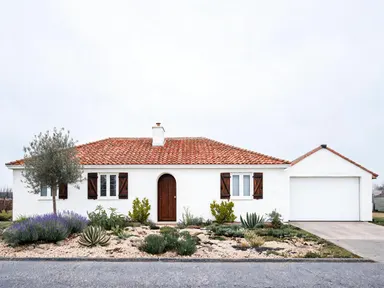
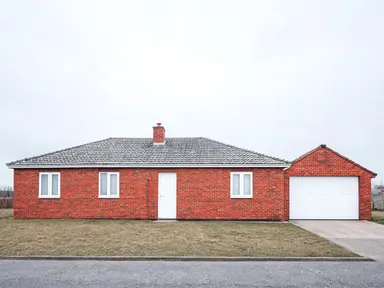
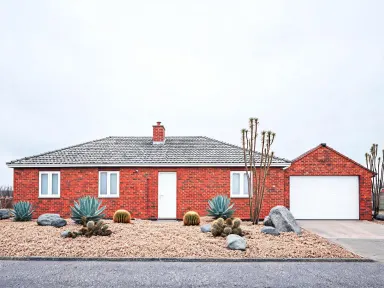
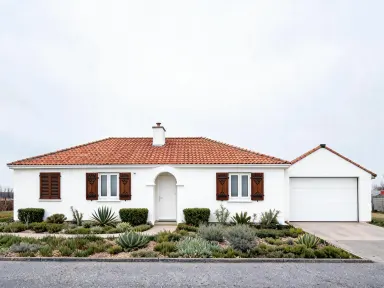
AI Exterior Design takes a photo of your house and rebuilds its outside in a style you choose from a curated library of twelve architectural finishes and twelve garden landscapes. It keeps your home's footprint and proportions intact while applying materials, colours and planting with enough detail to share with a builder, a landscaper or a planning committee. Homeowners exploring a renovation, agents preparing a listing and architects running early design conversations with clients will all find a use for it.
How to use this app
- 1
Upload your file. There is no prompt you have to write.
- 2
Pick a look from the visual library, add a note of your own if you want one, then press Generate.
- 3
Watch your result appear in the gallery within moments.
- 4
Download, share, or generate again with a new idea.
What you can make
Renovation Shortlisting Before You Commit
Upload a current photo of the house and work through several library options in one session. Comparing a Nordic black timber finish against a colonial red brick on the same structure gives a client or a partner something concrete to react to, long before any money is spent on drawings or samples.
Estate Agent Listing Enhancement
A tired render or dated weatherboard exterior can suppress interest. Generate a modern farmhouse or coastal version of the property and use the result alongside the current photos to show buyers the potential, with the rendered image clearly labelled as a visualisation.
Garden Design Discovery
Drop in a front garden photo and try the wildflower meadow option, then the formal parterre, then the desert planting. Seeing those landscapes in front of your actual house, rather than a generic stock image, makes the style decision far less abstract and helps narrow the brief for a landscape designer.
Planning Application Support
Councils and neighbourhood review boards often respond better to photorealistic visuals than to line drawings. A 1K resolution output showing the proposed Tudor or craftsman treatment applied to the existing building gives a planning officer something they can assess at a glance.
Social Media Before and After Content
Interior designers and renovation accounts regularly publish transformation content. AI Exterior Design produces a clean high resolution restyled image that pairs directly with the original upload for a before and after post, without any manual compositing.
Shots to try
Tips for better results
Shoot Straight On for Best Results
A photo taken roughly parallel to the facade, without strong perspective lean, gives the app the clearest read of proportions. Angled or fisheye shots can cause the applied materials to wrap unevenly. A simple phone shot from the pavement at mid height works well.
Use the Text Box for One Specific Detail
The optional free text box is most useful when you have one concrete constraint: keep the existing front door colour, exclude a particular tree, or hold the garage door position. One clear instruction works better than several competing ones, as the library choice is doing the heavy lifting.
Separate Architecture and Garden Runs
The library covers both building exteriors and garden landscapes. Running an architectural style first and then a garden style on the same original photo lets you mix results in any image editor, giving you a building restyled in one option with a garden restyled in another.
Use High Resolution Output for Sharing
The app renders at 1K resolution or above, so the output is large enough to present on screen, print at A3 or drop into a slide deck without visible degradation. Download the full file rather than screenshotting the preview to preserve that quality.
When to choose this app
AI Exterior Design is the right choice when the task is specifically about the outside of a building and its surrounding landscape. FLUX Kontext Pro edits images with text instructions, which suits general image changes but does not offer a curated library of architectural and garden styles to select from. AI Camera Angle Changer reshots a scene from a new viewpoint rather than restyling its materials or planting. If you already know which of the twelve exteriors or twelve gardens you want to see on your house, this app delivers that result in fewer steps than any open ended editing tool.
Frequently asked questions
Will the app change the shape or footprint of my house?
No. The app keeps your building's existing volume, roofline and window positions intact. It applies new materials, colours and surface details over the existing structure. If your house has a steep gable, it stays steep. The style library changes the appearance, not the architecture.
Can I apply a garden style and an architectural style at the same time?
You pick one library option per run. If you want both a new exterior finish and a new garden, run the app twice on the same original photo and then combine your preferred outputs in any image editor. Keeping the runs separate also makes it easier to compare options independently.
What file types can I upload?
The app accepts JPG, PNG, WebP and GIF files. Drag the file into the upload area or pick it from your device. Larger, clearer photos tend to produce sharper results, so use the highest quality version of the image you have available.
What does the optional text box let me add?
After choosing a library style you can type one extra instruction: a detail to preserve, something to leave out or a specific colour preference. It is entirely optional. The library choice defines the overall look, and the text box is there for cases where one particular constraint matters to you.
Is the output suitable to show a builder or a planning authority?
The app produces photorealistic high resolution images that many users share with builders, landscapers and planning committees as an early design visualisation. They should always be labelled clearly as computer generated images, not as approved drawings or professional architectural specifications.
Can I use a photo taken from inside a car or at street level on a phone?
Yes. A standard smartphone photo taken from the pavement works well. The main things to avoid are extreme angles, heavy lens distortion and very low light conditions, all of which make it harder for the app to read the facade accurately and apply the chosen style cleanly.
How much does it cost?
Each generation costs 1 credit. New accounts get free credits to try it out.
Do I need any editing skills?
No. Upload your photo, pick the look you want from the library, and the app writes the full instruction for you behind the scenes. There is nothing to install and nothing to configure. A small optional box lets you add one line in your own words, but the app works without it.
Can I use the results commercially?
Yes. Content you generate is yours to use, subject to our content licenses.
How long does a generation take?
Most generations finish in under a minute, and you can watch progress live in the gallery.