Made with this app
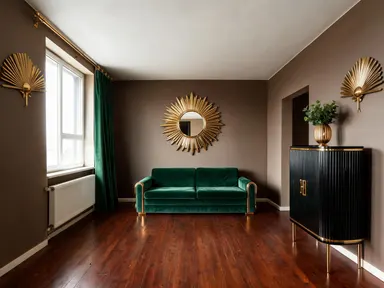
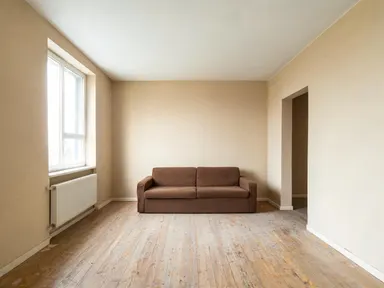
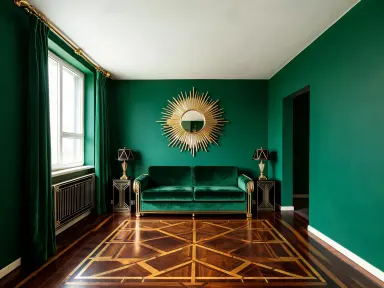
AI Interior Design takes a photo of any room you already have and shows you what it would look like redecorated in a style you choose from a curated visual library. Upload a JPG, PNG, WebP or GIF of your living room, bedroom, kitchen or any other space, pick one of 24 distinct styles, and the app rebuilds the room's furnishings, textures, colours and accessories while keeping the walls, floor plan and proportions exactly where they are. It is built for homeowners planning a refresh, renters visualising possibilities and designers presenting mood concepts to clients.
How to use this app
- 1
Upload your file. There is no prompt you have to write.
- 2
Pick a look from the visual library, add a note of your own if you want one, then press Generate.
- 3
Watch your result appear in the gallery within moments.
- 4
Download, share, or generate again with a new idea.
What you can make
Renovation Planning Before Committing
Before buying a single piece of furniture, upload your current lounge and cycle through several library styles. Seeing your actual room in a mid century modern or industrial loft finish removes guesswork and helps you commit to a direction with confidence.
Client Presentations for Interior Designers
Designers can drop a client's room photo in, run it through three or four contrasting styles and arrive at a meeting with polished visuals rather than abstract mood boards. The 1K+ resolution output holds up well on a laptop screen or printed A4 brief.
Rental Property Staging Concepts
Landlords and letting agents can show prospective tenants how a neutral empty room could be furnished. A coastal or Scandinavian pass on a bare bedroom communicates liveability without staging costs.
Social Media Content for Home Accounts
Home decor creators can generate before and after content from a single room photo. Running the same space through a bohemian pass and then a dark moody pass produces two distinct posts with consistent architecture, useful for comparison content.
Exploring Opposite Aesthetic Directions
The library spans 24 styles from wabi sabi to Art Deco, making it easy to test aesthetics that feel completely foreign to your current space. Seeing an unlikely style rendered in your own room is often what unlocks a genuine decision.
Shots to try
Tips for better results
Shoot in Good Natural Light
The app reads the existing room to preserve its structure. A well-lit photo with visible walls, floor and ceiling gives the app more spatial information to work with, producing a result where the new style sits convincingly inside the actual room volume.
Include the Whole Room in Frame
Wide shots that show at least two walls and the floor produce more complete redesigns than tight detail shots. The app rebuilds furnishings and surfaces across the visible space, so more room in frame means more redesign to evaluate.
Try Styles That Contrast Sharply
Because the walls and floor plan stay fixed, the most useful comparisons often come from styles at opposite ends of the spectrum. Running a traditional room through the strict minimalist option or a bare new-build through the maximalist option reveals the full range of possibility.
Use the Output at 1K+ for Client Work
The app renders at 1K+ resolution, which means the output is sharp enough to embed in a PDF proposal, print at A4 or display on a presentation screen. Save the file before closing the session to preserve that full resolution.
When to choose this app
AI Interior Design is the right choice when the starting point is a real room and the goal is to see a complete style transformation of that specific space. FLUX Kontext Pro lets users edit images with text instructions, which suits targeted changes to a photo rather than a full-room restyle. AI Camera Angle Changer reshoots the same subject from a new viewpoint rather than changing its décor. Neither handles the end-to-end job of mapping 24 distinct interior styles onto an uploaded room and preserving the underlying architecture, which is what this app is built for.
Frequently asked questions
Does the app change the shape or dimensions of my room?
No. The walls, floor plan, ceiling height and windows in your photo stay in place. The app replaces furnishings, textiles, colours and surface materials within the existing structure, so the result always looks like your actual room rather than a generic stock interior.
How many styles can I try on a single room photo?
You can run the same photo through as many of the 24 library styles as you like, one at a time. Each run produces a separate output and its exact credit cost is shown on the generate button before you commit, so it is straightforward to build a side-by-side comparison of three or four styles from one uploaded image.
What file formats does the upload accept?
The app accepts JPG, PNG, WebP and GIF files. You can drag the file directly into the upload area or browse your device to select it. There is no URL or link input: the file comes from your own device.
Can I use this app for rooms other than living rooms?
Yes. The app works on any interior space: bedrooms, kitchens, dining rooms, home offices, bathrooms and commercial spaces all produce valid results. The library styles apply to any room type, though some styles will naturally suit certain spaces more than others.
Does it work on a completely empty room?
Yes, and that is one of the more useful things it does. If the room you upload has no furniture in it, the app furnishes it from scratch in the style you picked rather than returning the same bare walls, which makes it a quick way to produce virtual staging concepts for an empty property. The windows, doors and floor plan stay exactly where they are, so the staged result still reads as that specific room.
Is one run enough to evaluate a style, or should I try it more than once?
A single run gives a solid representation of a style in your room. If you want to see a different arrangement of furniture within the same style, running it a second time can produce a meaningfully different layout. Styles with strong signature elements, such as Art Deco or Japandi, tend to be consistent across runs.
How much does it cost?
Each generation costs 1 credit. New accounts get free credits to try it out.
Do I need any editing skills?
No. Upload your photo, pick the look you want from the library, and the app writes the full instruction for you behind the scenes. There is nothing to install and nothing to configure. A small optional box lets you add one line in your own words, but the app works without it.
Can I use the results commercially?
Yes. Content you generate is yours to use, subject to our content licenses.
How long does a generation take?
Most generations finish in under a minute, and you can watch progress live in the gallery.