これらの正確なプロンプトで作成
厳選された結果セット。任意のタイルにカーソルを合わせて、プロンプトを試してみてください。
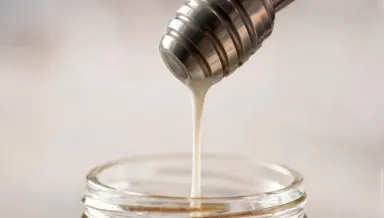 Runway Gen-4 Image Turbo 1c
Change the honey to bright white milk and the wooden dipper to brushed stainless steel, leaving the drop's exact shape, the falling thread, the hard side light and the soft jar rim below completely unchanged.
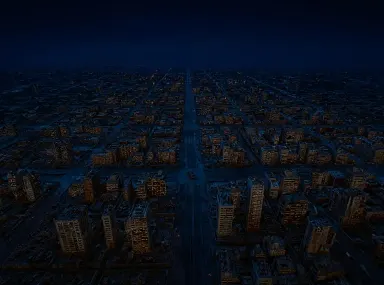 FLUX Kontext Pro 1c
Change the scene from amber overcast day to clear night: darken the sky to deep blue-black, light every window in the grid in warm gold, add red aircraft beacons on the tallest towers, and leave the street layout and camera exactly as they are.
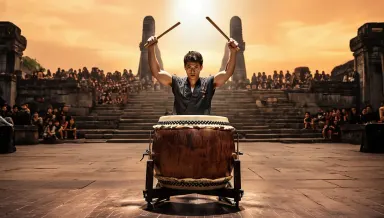 Runway Gen-4 Image 2c
Replace the dark rehearsal hall behind the drummer with a vast open air temple courtyard at golden hour, adding distant stone pillars and a crowd seated on the steps, keeping the drummer, the drum and the hard overhead light exactly unchanged.
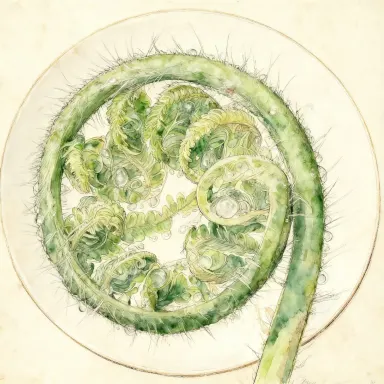 Seedream v4.0 Edit 1c
Convert the image to a detailed scientific watercolor illustration in the style of a Victorian botanical plate, with fine ink outlines, hand-painted color washes, and cream paper texture visible in the background.
 Seedream 5.0 Lite 1c
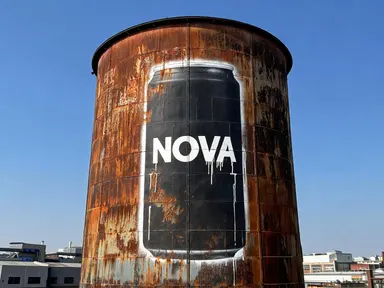
Your product, painted the size of a building
 Nano Banana Lite 1c
One packshot, your headline, a finished ad
画像を読む14個のモデル
Nano Banana Pro
Google Gemini 3 Pro プレミアム画像生成
Nano Banana 2
Google Gemini 搭載の画像生成
Nano Banana Lite
2秒未満のGoogle Gemini画像生成と編集
Seedream 5.0 Pro
画像上テキストと精密編集を備えたフラッグシップ深い思考画像モデル
Seedream v4.5
最大16MP出力の高度なテキストから画像への生成
Seedream 5.0 Lite
深い思考モード付きの最新世代
GPT Image 2.5 Flare
大量のクリエイティブワーク向けの高速GPT Image 2.5
GPT Image 2.5 Sunburst
本番対応のキャンペーン制作向けプレミアムGPT Image 2.5
GPT Image 2
OpenAIの最新画像生成モデル
FLUX 2 Pro
プロダクションレベルのフォトリアリズム
Runway Gen-4 Image
参照ガイド型画像生成
Runway Gen-4 Image Turbo
高速参照ガイド型画像
Seedream v4.0 Edit
予算に優しいAI画像編集
Nano Banana 2.1
Googleの最新のGeminiイメージモデル
より長いプロンプトより参照画像が優れている理由
ユースケース
- 複数の画像全体で1つのキャラクターを認識可能に保つ
- アクセスできなかった背景で商品を再撮影する
- プロンプトでは見落とされているブランドパレットを一致させる
- 粗いスケッチやスクリーンショットを完成した画像に変える
- ゼロから始めるのではなく、既に所有している写真をリスタイリングする
- 1つを選択する前に、複数のモデルで同じリファレンスを試す
画像から画像への生成、よくある質問
画像から画像への生成とは何ですか?
モデルにプロンプトと共に画像を提供します。その画像は顔、商品、色合い、構図など、文章では説明しにくい要素を含み、プロンプトはそれをどうするかを指示します。
何枚のリファレンス画像を使用できますか?
モデルによって異なります。各モデルは読み込む参照画像の数を指定し、その制限はピッカーの横に表示されるため、表示される数はこのページに記載された数字ではなくモデル自体の制限です。
費用はいくらですか?
クレジットで実行され、クレジットコストは実行前に表示されます。新しいアカウントは無料クレジットで開始され、毎日無料の配分があります。
結果を商業的に使用できますか?
はい。Artezaで生成された画像はビジネス利用向けの商用ライセンスが付与されます。