Made with this app
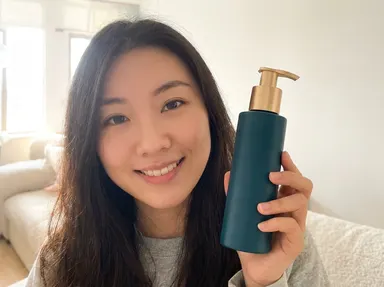
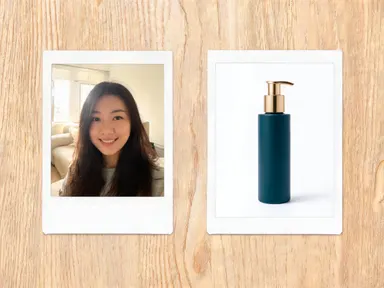
Make People Hold Your Product takes a photo of a person and a photo of your product and returns one natural photograph of that person holding it. Both uploads are preserved: the person stays recognisably themselves, and the product keeps its own shape, colour, finish and label rather than being redrawn as something similar. Upload one portrait and one product shot, pick the kind of shot you want, add an optional detail if you like, and the app produces a single coherent photograph rather than a cut-out pasted into a scene.
How to use this app
- 1
Upload your file. There is no prompt you have to write.
- 2
Pick a look from the visual library, add a note of your own if you want one, then press Generate.
- 3
Watch your result appear in the gallery within moments.
- 4
Download, share, or generate again with a new idea.
What you can make
Small brands with a packshot and no model
Most small sellers own a clean photo of the product on white and nothing else. Booking a model, a photographer and a location for one launch is out of reach. This turns the packshot you already have into lifestyle imagery of somebody holding it, in a kitchen, a bathroom or on a sunlit street.
Marketplace and storefront listings
Listings that show only a product on white leave the buyer guessing at scale. A photograph of the item in a hand answers how big it is, how it is held and what it is for, without a studio day and without re-shooting every time the range changes.
Creator and affiliate content
Affiliates often have to promote something before a sample arrives. Upload a portrait of the creator and the brand's own product image and you get a review-style shot of them holding it, matching the framing that reads as genuine on social feeds.
Ad variants without a reshoot
Testing creative usually means one shoot and one look. Because the setting is chosen from a library, the same person and the same product can be shown in a studio, on a beach, under neon or at golden hour, giving you variants to test rather than a single expensive asset.
Wholesale and pitch decks
A buyer's deck reads very differently when the product appears in use rather than floating on white. An in-hand photograph at 4K is enough for a slide, a one-pager or a printed line sheet, and can be produced for each item in a range in an afternoon.
Shots to try
Tips for better results
Upload the product on a plain background
The clearest product upload is the one you would put on a listing: the item alone, lit evenly, with nothing overlapping it. A photo where the product is half behind something else forces the app to infer the hidden part, and inferred parts are where shape and finish drift.
Show the whole product, not a detail crop
The result places the item in a hand at a believable size, which needs the whole silhouette. A tight crop of one corner of the packaging leaves the proportions to be guessed at, and a product that comes back the wrong height is not usable even when everything else is right.
Use a well-lit, forward-facing portrait
The person is carried through from your upload, so a clear, evenly lit portrait where the face is fully visible preserves the likeness far better than a side angle or a dark shot. A phone photo in natural light is enough.
Use the optional text box for one detail
The library choice sets the shot and the setting. The optional free text box is for a single specific instruction, such as which hand holds the product, a piece of clothing to keep, or something to leave out of the background. One clear instruction gives a more predictable result than several.
Choose 4K for anything printed or paid
The app outputs at 1K, 2K or 4K. Listing thumbnails and social drafts are fine at lower settings, but a paid ad, a printed line sheet or a pitch deck slide wants the detail the 4K premium tier produces.
When to choose this app
This is the only app in the Arteza suite that preserves two different uploads of two different kinds in one photograph. AI Product Photography takes a single product upload and builds a scene around it, but nothing in its library can introduce a real uploaded person, because it never receives one. AI Photo Together merges two uploads, but both of them are people, and its template is written to protect faces rather than manufactured detail. Here the two promises are deliberately unequal: a face that is close is still the same person, while a bottle that is close is a different product, so the product is held to the stricter standard and is not redesigned, relabelled or restyled.
Frequently asked questions
Do I need a photo of the person, or does the app generate one?
You upload the person. The app does not invent a model. It needs two files, one portrait and one product photo, and it combines those two specific subjects. If you want a person you do not have a photograph of, that is a different task and this app is not it.
Will my product keep its own label and packaging?
Yes. Preserving the product's own shape, proportions, colour, material, finish and label text is the point of the app, and the instruction not to redesign, relabel or restyle it is sent with every image the app produces. The app is also instructed not to add any other text, lettering or logos elsewhere in the image.
What kinds of products work best?
Anything a person can plausibly hold in one or two hands: bottles, jars, tubes, boxes, cans, small devices, books and packaged goods. Something far too large or too small to hold gives the app a physically impossible instruction, and the hand or the scale will look wrong even when the product itself is reproduced accurately.
Can I control which shot I get?
The library sets the shot. It is grouped into three: showing the product to camera, using it somewhere, and advertising looks. The first group is for review and listing imagery, the second places the product in a room where it would be used, and the third is styled for campaign and ad use.
What file types can I upload?
Both upload areas accept JPG, PNG, WebP and GIF files. You drag a file in or pick one from your device. Submit one file per upload area, the person in the first and the product in the second.
Is the result one photograph or a composite?
The app is built to return a single coherent photograph, not a collage. Lighting, perspective, scale and the way the fingers wrap around the product are rendered as part of one scene, and the template explicitly rules out a split panel or two pictures placed side by side. At 4K and premium quality the output is suitable for listings, ads and print.
Do I need any editing skills?
No. Upload your photo, pick the look you want from the library, and the app writes the full instruction for you behind the scenes. There is nothing to install and nothing to configure. A small optional box lets you add one line in your own words, but the app works without it.
Can I use the results commercially?
Yes. Content you generate is yours to use, subject to our content licenses.
How long does a generation take?
Most generations finish in under a minute, and you can watch progress live in the gallery.