Made with this app
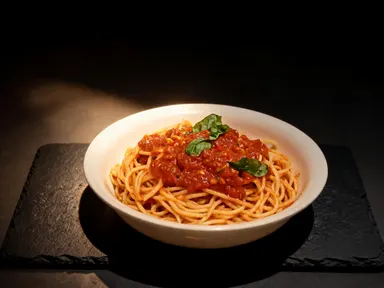
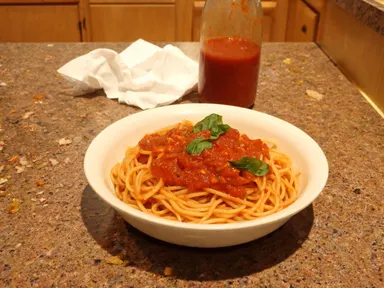
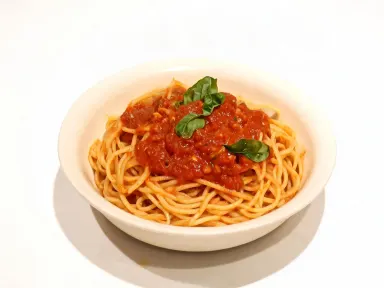
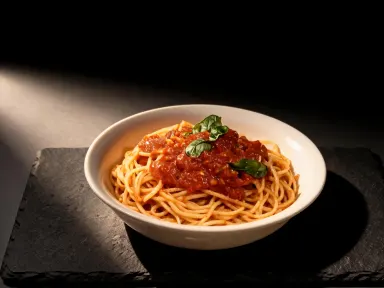
AI Food Photography transforms an ordinary phone photo of a dish into a polished, publication-ready image by placing it inside a chosen professional scene. Upload a JPG, PNG, WebP or GIF of your food, select a setting from the visual library, and the app rebuilds the shot: correct lighting, the right surface, the right atmosphere, rendered at 1K+ resolution. It is built for restaurant owners, food bloggers, delivery operators and recipe creators who need great food images without a studio booking.
How to use this app
- 1
Upload your file. There is no prompt you have to write.
- 2
Pick a look from the visual library, add a note of your own if you want one, then press Generate.
- 3
Watch your result appear in the gallery within moments.
- 4
Download, share, or generate again with a new idea.
What you can make
Delivery App Listings
A phone snap of a burger looks flat and unappetising on a delivery platform. Choose the food delivery listing style and the app places the dish on a warm grey background under bright, even light, producing the clean, colour-accurate image that makes customers tap.
Printed Menu Design
Menu designers need consistent white-background shots across every dish so layouts hold together. The clean menu photograph option delivers each item on a pure white sweep with near-shadowless front lighting, making every plate slot into a grid without retouching.
Social Media Content
Overhead flat lays and moody dark-table shots perform differently across Instagram and Pinterest. The library covers both, letting a cafe owner shoot once and generate multiple scene variations from a single upload to fill a weekly content calendar.
Seasonal Campaign Imagery
The festive holiday table and golden hour options let a restaurant update promotional imagery for specific seasons without a reshoot. Upload the signature dish once and generate a version that reads as Christmas, summer terrace or date-night depending on the scene chosen.
Editorial and Magazine Pitches
Food writers and cookbook authors pitching to publications need images that read as professionally shot. The glossy food magazine editorial option places the dish on a dark stone surface with hard side lighting and visible steam, matching the visual language editors expect.
Shots to try
Tips for better results
Upload a Sharp Source Photo
The app works from the detail present in your file. A well-lit, in-focus phone shot gives it more surface texture, colour accuracy and edge definition to carry into the new scene. A very blurry or heavily compressed image limits how much the output can recover.
Match the Scene to the Platform
Different channels have different visual conventions. The clean menu and delivery listing scenes suit platforms where accuracy matters. The dark restaurant and fine dining scenes suit premium social and print. Choosing a scene whose mood matches where the image will live avoids a disconnect between the food and the context.
Use Macro for Hero Details
The extreme close-up macro option crops completely into the food, so no plate rim or table appears. Use it when a single detail, a drip of glaze, a seeded crust, a curl of steam, needs to carry a whole banner or cover. It works best on textured, layered or glossy subjects.
Generate Multiple Scenes from One Upload
Because you keep the same source file, you can run several library choices in sequence from one photograph. This produces a set of scene variants from a single dish that can be distributed across different channels, seasonal campaigns or menu formats without returning to the kitchen.
When to choose this app
AI Food Photography is the right choice when the goal is to place a dish inside a complete, purpose-built scene: the right surface, lighting rig and atmosphere, chosen from a curated library. FLUX Kontext Pro lets users edit images with text instructions, which suits targeted retouching but requires the user to direct each change in words. AI Camera Angle Changer repoints the camera on an existing scene rather than rebuilding the environment around the food. When the job is to take a plain phone photo and produce a finished, scene-correct image ready for a menu, a listing or a publication, this app handles the full transformation in one step.
Frequently asked questions
What file types and sizes can I upload?
The app accepts JPG, PNG, WebP and GIF files. You can drag the file in or pick it from your device. For the best output resolution, start with the highest-quality version of the photo you have, since the app renders up to 1K+ on the way out.
Will the app keep the food looking like my actual dish?
Yes. The app rebuilds the scene around your dish, preserving its shape, colour, portion size and visible ingredients, so the garnish, sauce finish and plating you uploaded carry through. The dish it is served in is kept too, deliberately: your bowl is your bowl. That also means a takeaway container comes through as a takeaway container, so plate the food before you photograph it.
How does the library scene affect the final image?
Each library option specifies a surface, a light source, a background and a camera position. The app applies all of those together, so choosing the dark restaurant scene, for example, produces rim lighting, a slate slab and a near-black background rather than just a colour-tinted version of your original photo.
Can I use the output for printed menus and physical marketing materials?
The app renders at 1K+ resolution, which is suitable for many digital and small-format print applications. For very large format print such as banners or posters, check the pixel dimensions of your output against your printer's requirements before sending to press.
What happens if my original photo has a cluttered or distracting background?
The scene you choose replaces the entire background, so an original shot taken on a kitchen counter, a restaurant table or a delivery bag does not carry through. The food is extracted and rebuilt into the selected environment, which is why the quality and sharpness of the food itself matters more than what surrounds it in the upload.
Are some dishes better suited to certain library scenes?
Yes. Tall or stacked dishes, burgers, layered cakes, show well in the side-lit scenes like dark restaurant or rustic farmhouse because height reads clearly. Flat dishes, grain bowls, sushi platters and sharing plates work especially well in the true overhead flat lay, where the geometry of the arrangement is the visual subject.
How much does it cost?
Each generation costs 1 credit. New accounts get free credits to try it out.
Do I need any editing skills?
No. Upload your photo, pick the look you want from the library, and the app writes the full instruction for you behind the scenes. There is nothing to install and nothing to configure. A small optional box lets you add one line in your own words, but the app works without it.
Can I use the results commercially?
Yes. Content you generate is yours to use, subject to our content licenses.
How long does a generation take?
Most generations finish in under a minute, and you can watch progress live in the gallery.