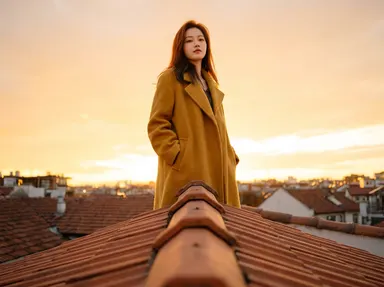
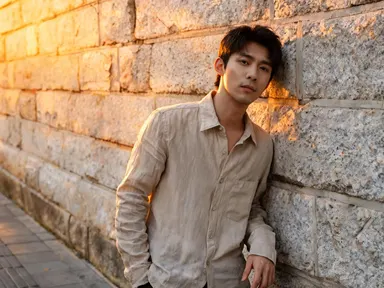
Made with this app
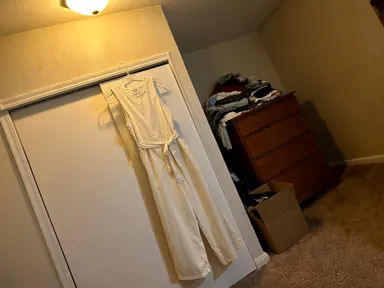
AI Fashion Model takes a photo of a garment on a hanger, laid flat or on a mannequin, and returns a full head-to-toe image of it worn by a model in the setting you choose from a curated library of 24 lighting and location setups. It is built for clothing brands, independent designers, Etsy sellers and social media stylists who need convincing on-figure imagery without booking a shoot. Pick a background, optionally note a detail to keep or leave out, and the app handles everything else.
How to use this app
- 1
Upload your file. There is no prompt you have to write.
- 2
Pick a look from the visual library, add a note of your own if you want one, then press Generate.
- 3
Watch your result appear in the gallery within moments.
- 4
Download, share, or generate again with a new idea.
What you can make
E-commerce product pages
A hanger shot of a linen blazer becomes a clean white-sweep studio image ready to drop straight into a product listing. The seamless background isolates the garment for easy cropping, and the even front lighting shows every seam and button without distraction.
Seasonal lookbook spreads
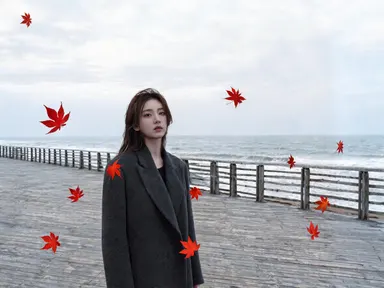
Upload a summer dress and choose the pale wet shoreline setting to get a warm, lifestyle-ready image for a brand lookbook. Pair several garments against the same background for a consistent editorial look across the whole collection without coordinating a location shoot.
Social media content at scale
A small brand with dozens of SKUs can work through a full range in one session, placing each piece in a different setting from the library to keep the feed visually varied. The optional free-text box lets you specify a detail such as sleeves rolled or collar up.
Menswear vs womenswear presentation
The Who wears it chip row lets you choose A woman, A man or Let the garment decide. A unisex oversized coat can be presented both ways in separate outputs, giving buyers a direct comparison without any additional setup or reshooting.
Pitch decks and wholesale catalogues
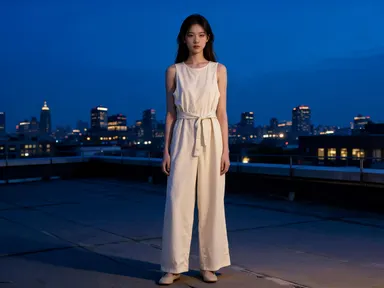
Designers presenting to buyers before samples are produced can upload flat-lay technical photos and return fully styled model shots. The dramatic concrete-and-hard-light or rooftop-at-dusk options add editorial weight to a wholesale or investor presentation.
Shots to try
Tips for better results
Start with a clean garment photo
The app reads fabric texture, drape and colour most accurately when the garment is fully visible against a plain background. A white or pale wall behind a hanger, or a clean floor under a flat lay, gives the app the clearest read before it applies your chosen setting.
Let the garment decide by default
The Who wears it control defaults to Let the garment decide, which works well for most pieces. Override it only when the silhouette genuinely reads differently on a man or woman, or when your output is going into a specific catalogue section where consistency matters.
Use the text box for one specific detail
The optional free-text box works best with a single concrete instruction: a pose direction, a particular button left undone, or a background element to suppress. Stacking several requests in one note can dilute each one; the library choice carries the heavy lifting.
Match setting drama to fabric weight
Heavy outerwear tends to read well in high-contrast settings such as the rimlit dark charcoal studio or the rain-soaked night asphalt. Lightweight or pastel pieces often look stronger in soft diffused settings like the pale plaster wall or the park afternoon. Let the fabric's character guide your library pick.
When to choose this app
AI Fashion Model is the right choice when the core job is taking a garment off a hanger and onto a model in a dressed-set environment. FLUX Kontext Pro edits images with text instructions, and AI Camera Angle Changer reshoots an existing photo from a new viewpoint: neither starts from a flat garment and builds a full styled figure around it. AI Fashion Model's library of 24 distinct lighting and location setups, combined with the Who wears it control, makes it the fastest path from product photography to on-figure imagery across an entire range.
Frequently asked questions
What kinds of garment photos work best as uploads?
Hanger shots, mannequin shots and flat lays all work. The garment should fill most of the frame and be photographed against a plain, uncluttered background. Busy or patterned backgrounds can confuse the app's reading of fabric edges, so a clean surface behind the piece produces the most accurate result.
Will the app keep the exact colour and print of my garment?
Yes. AI Fashion Model uses style and colour transfer to carry the garment's actual colour, print, texture and surface detail into the output. Unusual dye effects, bold prints and textured weaves are preserved rather than averaged out, so the result reflects the real product rather than a generic interpretation.
Can I control the model's pose or expression?
The library controls the setting and lighting, not the pose directly. For a specific pose, use the optional free-text box beneath the library grid and describe it briefly, for example 'hands in pockets' or 'facing slightly to the side'. The app will attempt to apply it, though the setting you choose also influences what poses read naturally.
How does the Who wears it chip row work?
Above the library grid is a short row of chips labelled Let the garment decide, A woman and A man. Leaving it on the default Let the garment decide is fine for most garments. Select A woman or A man when you need the figure to match a specific catalogue section or when you want to produce both versions for a gender-inclusive listing.
What file formats can I upload?
The upload area accepts JPG, PNG, WebP and GIF files. You can drag a file straight onto the upload area or pick one from your device. There is no URL or link field: the file comes directly from your computer or phone.
Can I generate multiple settings for the same garment in one session?
Yes. Once your garment photo is uploaded, you can select a different library option and run the app again without re-uploading. This makes it straightforward to produce a white-sweep studio version for a product page and a lifestyle outdoor version for social media from the same source image in one sitting.
How much does it cost?
Each generation costs 1 credit. New accounts get free credits to try it out.
Do I need any editing skills?
No. Upload your photo, pick the look you want from the library, and the app writes the full instruction for you behind the scenes. There is nothing to install and nothing to configure. A small optional box lets you add one line in your own words, but the app works without it.
Can I use the results commercially?
Yes. Content you generate is yours to use, subject to our content licenses.
How long does a generation take?
Most generations finish in under a minute, and you can watch progress live in the gallery.