Made with this app
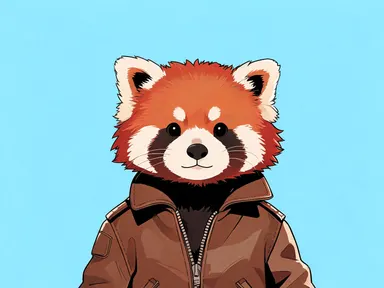
AI Furry Generator turns a short character description into an illustrated anthropomorphic portrait. Describe the species, colours, personality or any detail that matters to you, choose one of eight drawing styles, and the app builds the rest: a chest-up portrait of a single clothed character, rendered at up to 1K resolution and ready to save. It suits character designers, writers building a visual for a story persona, and anyone who wants to see a creative character concept brought to life without drawing from scratch.
How to use this app
- 1
Upload your file. There is no prompt you have to write.
- 2
Pick a look from the visual library, add a note of your own if you want one, then press Generate.
- 3
Watch your result appear in the gallery within moments.
- 4
Download, share, or generate again with a new idea.
What you can make
Visualising a story character
Writers who know their character's species, colours and personality but have no illustration skills can describe them in the text box and choose "Painterly" for a warm, finished-looking portrait. The result gives a visual anchor for the character without commissioning custom art.
Exploring a fursona concept
Someone building a fursona can describe their intended species and markings, then try the same description under "Cel shaded" and "Watercolour" across separate generations to see which drawing style fits the personality they have in mind.
Tabletop roleplaying avatars
A player who wants a character portrait for their online game table can describe their character and choose "Comic book" for bold, confident lines that read well at small avatar sizes, or "3D render" for a look closer to a video game card art style.
Novelty gift design reference
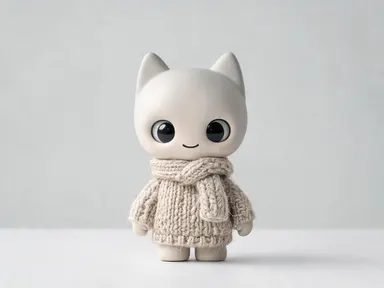
Someone commissioning a personalised print or plush often needs a clear visual brief for a maker. Running a description through "Soft toy" produces a stuffed-toy-style portrait that communicates the intended look far more precisely than words alone.
Style comparison for character art
A game developer or illustrator scoping out a visual direction can type the same character description and run it through "Chibi", "Rubber hose cartoon" and "3D render" to compare how the same character reads across different aesthetic registers before committing to a direction.
Shots to try
Tips for better results
Describe personality, not just appearance
The app translates descriptive words like "nervous", "gruff" or "cheerful" into pose, expression and body language. Adding one personality word alongside species and colour often produces a more characterful result than listing markings alone.
Match the style tile to the end use
"Soft toy" and "Chibi" read well at small sizes and on merchandise mockups. "Painterly" and "Watercolour" suit editorial and print. "Comic book" and "Cel shaded" hold up as profile pictures. Choosing the tile with the destination in mind saves running unnecessary generations.
Be specific about distinctive markings
Because two generations of the same description produce two similar but not identical results, any marking that matters to the design should be stated clearly in your description. Vague descriptions give the app more freedom, which is useful for exploration but less so when precision matters.
Use two or three generations to find the best read
The app interprets each description freshly, so running the same entry twice under the same tile often surfaces a pose or expression that fits the character better. Try a small number of generations and compare before settling on the one to save.
When to choose this app
AI Furry Generator is the right choice when the output is a character illustration rather than a finished product with words in it. AI Greeting Card draws lettering into the artwork itself, and AI Book Cover returns a complete front cover with a title, so both are built around text as part of the image. This app produces a clean character portrait with no words on it at all, which makes the result easier to drop into a project, use as an avatar or hand to another artist as a visual brief.
Frequently asked questions
How specific should my character description be?
As specific as the character requires. Species and one or two defining traits, such as colouring or expression, are enough for a general portrait. If particular markings, accessories or personality cues matter to you, include them: the app uses everything you write to shape the pose, expression and detail of the result.
Can I ask for a character to wear a specific outfit or hold something?
Every character comes back fully clothed in everyday clothing, and you can describe clothing in your text to nudge the result. Asking for a specific held object is worth trying, though the app treats it as a suggestion rather than a guarantee and results vary. The character will always be dressed and appropriate for all audiences regardless of what you write.
Will the same description produce the same character each time?
Not exactly. Two generations of the same description return two portraits that share the same species, colours and general character, but pose, expression and small details will differ between runs. The app is well suited to exploring a character concept rather than locking a single design down across a set of images.
Which style tile should I choose if I want the result to work as a social media avatar?
"Cel shaded" and "Comic book" both use strong outlines that hold up when cropped small. "3D render" produces a polished look closer to a modern animated film, which also reads clearly at avatar size. "Chibi" works if a cartoon proportion is part of the identity you want to project.
Can the app draw my character alongside another character or in a scene?
No. The app draws a single character from the chest up, alone in the frame. It does not compose groups, action scenes or environmental backgrounds with a character placed inside them. If you want a scene or multiple characters, that is a different kind of project that this app is not designed for.
Can I add a name or any text to the finished portrait?
The app does not place words, letters, numbers or any text on the image. This applies to the whole picture: there is no caption area, signature field or nameplate, and the text box cannot change this. If you need a character portrait with a name drawn into it, a different tool would be needed for that step.
How much does it cost?
Each generation costs 1 credit. New accounts get free credits to try it out.
Do I need any editing skills?
No. Upload your photo, pick the look you want from the library, and the app writes the full instruction for you behind the scenes. There is nothing to install and nothing to configure. A small optional box lets you add one line in your own words, but the app works without it.
Can I use the results commercially?
Yes. Content you generate is yours to use, subject to our content licenses.
How long does a generation take?
Most generations finish in under a minute, and you can watch progress live in the gallery.