Made with this app
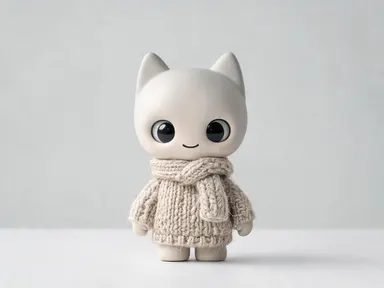
Labubu Doll Generator turns a short theme description into a studio-quality product photograph of a collectible designer toy figure. Type a subject, pick one of eight material finishes, and the app builds the full scene: a single mischievous monster figure, sharply lit against a seamless background, rendered at up to 1K resolution. It is made for collectors, toy designers, social media creators and anyone who wants original art-toy imagery without a camera or a physical prototype.
How to use this app
- 1
Upload your file. There is no prompt you have to write.
- 2
Pick a look from the visual library, add a note of your own if you want one, then press Generate.
- 3
Watch your result appear in the gallery within moments.
- 4
Download, share, or generate again with a new idea.
What you can make
Concept art for toy designers
Before committing to a physical run, toy creators can visualise how a theme reads in different materials. Type a character concept, compare "Glossy vinyl" against "Matte pastel", and share polished reference images with a manufacturer or crowdfunding audience.
Social content for collector communities
Art-toy collectors post daily on community boards and short-video feeds. A fresh "Mirror chrome" or "Glow in the dark" figure built around a seasonal or trending theme gives creators a sharp, on-brand image ready to post without a product shoot.
Themed gift and card artwork
A "Knitted jumper" figure themed around a friend's favourite animal or hobby makes a personalised digital keepsake for a birthday or holiday. The clean studio background drops cleanly into card layouts or printed art prints.
Brand mascot exploration
Studios and small businesses exploring a mascot direction can test character themes quickly. A "Floral print" or "Plush" figure themed around a brand's core idea gives stakeholders a concrete, charming visual to react to before any illustrator is briefed.
Mood board and trend research
Trend researchers in toy, fashion and lifestyle use imagery to anchor a concept deck. Generating a "Denim outfit" or "Matte pastel" figure around a micro-trend theme produces a compelling, original visual that makes a slide land better than a stock photo.
Shots to try
Tips for better results
Match the finish to the mood
The eight finish tiles do different emotional work. "Plush" reads as soft and playful, "Mirror chrome" as bold and futuristic, "Matte pastel" as gentle and aesthetic. Decide the feeling you want before you type the theme, and choose the tile that carries that feeling.
Be specific with your theme
Vague subjects like "nature" produce generic results. A specific phrase such as "deep ocean bioluminescence" or "1970s soul music" gives the app richer material to draw on and produces a figure with more character and detail in its paint and texture.
Try two or three themes for one finish
If you have settled on a finish, generate a small set of theme variations to find the one that works best with that material. A "Floral print" figure reads differently themed around wildflowers versus tropical jungle, and comparing a few helps you land on the strongest image.
Think about how the image will be used
The plain studio background is already clean enough to place on a white slide, a social post or a card layout. If you plan to print the result, the up to 1K resolution output gives you enough detail for standard print sizes without needing to rescale heavily.
When to choose this app
Choose Labubu Doll Generator when you need a self-contained collectible toy image built around your own theme, starting from nothing. AI Emoji Generator returns a single tiny icon sized for a chat interface, not a product-photograph-scale figure with material texture and studio lighting. AI Wallpaper composes a repeating or scenic image formatted for a phone screen, not a single object on a neutral background. When the goal is a sharp, characterful art-toy image you can use in a deck, a post or a print, this app is the right tool.
Frequently asked questions
What should I type in the subject box?
Type the theme you want the figure built around: a creature, a cultural reference, a season, a colour palette, a subculture or any concept with visual associations. The more specific and vivid the phrase, the more the app has to translate into the figure's colours, markings and character. One strong phrase is enough.
Can I get words or a name printed on the figure or the background?
No. The app produces a clean studio image with no text, lettering, numbers, logos or watermarks anywhere in the picture. That applies to the figure itself, its base and the background. If you need artwork with words drawn into it, AI Greeting Card or AI Meme Generator handle that.
What is the difference between the eight finish tiles?
Each tile sets what the figure is physically made of and how it reflects light. "Plush" gives fabric and stitching, "Glossy vinyl" gives a smooth moulded surface, "Mirror chrome" gives an electroplated reflective shell, and so on. The finish changes the entire material and lighting character of the result, not just the colour.
Will the result look like a photograph of a real toy I could buy?
It looks like a studio product photograph of a collectible designer toy, but the figure does not exist as a physical object. The app produces a digital image only. It has no connection to any toy manufacturer, and the image is not a production-ready design file for fabrication.
Can I generate a whole collection of figures together in one image?
The app always returns one figure alone on a plain background. It does not compose group shots, display shelf scenes or collection spreads. If you want several themed figures, generate each one separately and assemble them yourself in a layout tool.
How do the finish tiles interact with a dark or neon theme?
The theme and the finish work together and can reinforce or contrast each other interestingly. "Glow in the dark" is photographed in dim light, so a bioluminescent or nocturnal theme amplifies the effect. "Mirror chrome" reflects the studio environment, so a bold colour theme shows up in those reflections. Experimenting with combinations produces the most distinctive results.
How much does it cost?
Each generation costs 1 credit. New accounts get free credits to try it out.
Do I need any editing skills?
No. Upload your photo, pick the look you want from the library, and the app writes the full instruction for you behind the scenes. There is nothing to install and nothing to configure. A small optional box lets you add one line in your own words, but the app works without it.
Can I use the results commercially?
Yes. Content you generate is yours to use, subject to our content licenses.
How long does a generation take?
Most generations finish in under a minute, and you can watch progress live in the gallery.