Made with this app
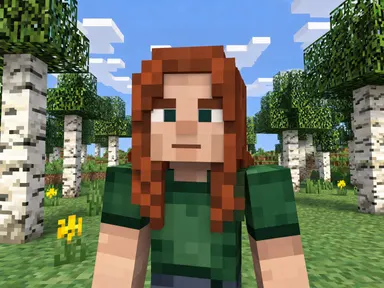
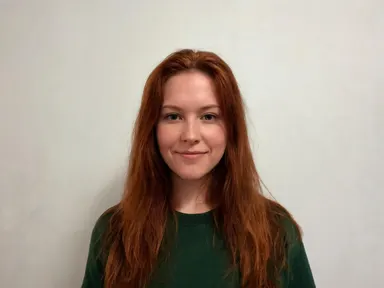
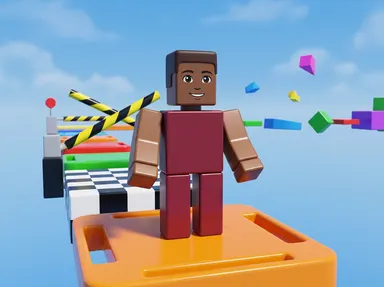
Minecraft AI Generator takes one photograph of you and rebuilds you as a blocky voxel character standing somewhere in that world. The head is a cube, the arms and legs are rectangles, and every surface is coarse pixel art with hard edges. You choose where you are standing from eight places: a birch forest, a diamond mine, the underworld, a village, the ocean, a mountain, a build site, or open ground at night. Your hair colour, skin tone and the colours you are wearing carry across, so the character reads as you even though the face is built from a handful of pixels. Nothing in the picture is written: no health bar, no hotbar, no item names.
How to use this app
- 1
Upload your file. There is no prompt you have to write.
- 2
Pick a look from the visual library, add a note of your own if you want one, then press Generate.
- 3
Watch your result appear in the gallery within moments.
- 4
Download, share, or generate again with a new idea.
What you can make
A profile picture that matches your username
Players who spend their evenings in a blocky world often want an avatar to match, and a screenshot of someone else's character is not personal. This builds one from your own photograph, carrying your hair and the colours you actually wear, so the figure on your profile is recognisably yours.
Birthday cards and party invitations
A child who plays this game constantly is easy to buy for and hard to make something for. Turning the birthday photograph into a voxel character standing in a village or a mine gives you an image for a card, an invitation or a printed banner that is about that specific child rather than a stock render.
Thumbnails and channel art for builders
Anyone posting builds, tutorials or survival series needs artwork that looks like the game without lifting frames from it. A character rendered in the same blocky style, standing at a build site or under a night sky, gives you a thumbnail face that belongs to the channel and not to somebody else's world.
Turning a family photo into a shared world
Run the same eight places with a photograph of each person in the house and you get a set of characters in one consistent style. Because the framing and the art direction are fixed by the app, the results sit together as a group rather than looking like eight unrelated pictures.
Seeing a familiar face rebuilt out of cubes
The simplest reason is curiosity about what a face looks like when it is reduced to blocks. The diamond mine tile lights it in blue from a wall of ore, the underworld tile lights it orange from lava, and the same character reads completely differently in each.
Shots to try
Tips for better results
Do not expect a likeness, expect a character
This is the app on the platform that travels furthest from your real face, and it does so deliberately. A cubic head of a few pixels cannot hold your features. What carries across is hair colour, skin tone and clothing colour. If you want a picture that still looks like you, use a portrait app instead.
Upload one person, close and well lit
The app works from a single photograph of a single person, framed from the chest up or closer. A sharp, evenly lit face gives the most faithful colours and hair. A group shot or a small face in a wide scene gives the app very little colour information to carry across.
Let the tile choose the place
Each of the eight tiles sets the whole scene, the light and the blocks around you. You do not need to describe the world yourself. Use the optional instructions box for small additions such as the colour of a shirt, rather than trying to move the character somewhere the tile did not pick.
Pick the tile for the light you want
The eight places differ most in how they light the character. The forest and village tiles are flat daylight, the mine and underworld tiles light from one side in blue or orange, and the night tile is dark with a cool sky. Choose the light first and the setting second.
When to choose this app
Minecraft AI Generator is the right choice when you want a voxel character built out of cubes rather than a photograph that has been filtered, and when the world around the character matters as much as the character. It is deliberately not a likeness tool. AI Sticker Maker turns a subject into a cut out sticker in a flat illustrated style, and AI Camera Angle Changer reshoots the same real subject from a new point of view, both of which keep far more of your actual face than this does. When the goal is to be rebuilt out of blocks and dropped into that world, this app is built for exactly that.
Frequently asked questions
Will the character still look like me?
Only in the way a blocky character can. A cubic head built from a handful of pixels cannot hold your facial features, so the app carries your hair colour, your skin tone and the colours you are wearing instead. People who know you will recognise the character by those things, not by the face.
Can I choose which part of the world I am standing in?
Yes, and that is the main choice the app offers. Eight tiles cover a birch forest, a diamond mine, the underworld, a village, the ocean, a mountain, a build site and open ground at night. The tile sets the blocks, the light and the whole scene behind your character.
Will my username or a health bar appear in the picture?
No. The pictures carry no writing and no game interface of any kind. There is no health bar, no hotbar, no item name, no username, no logo and no title card. What comes back is the scene and the character alone, so you can crop or caption it however you like.
Can I put my whole family in one picture?
No. The app takes one photograph of one person and returns one character, and it does not add anybody else to the frame. To make a set, run each person separately through the same tile. Because the style and framing are fixed, the results will sit together as a consistent group.
What should I upload to get the best result?
One clear photograph of one person, framed from the chest up or closer, in even light. The sharper and better lit the face, the more accurately your hair colour and skin tone carry into the blocks. Very small faces, heavy shadow and group photos all give the app less to work from.
Can I use the instructions box to change the scene?
The tile you pick sets the place, so the instructions box will not move you somewhere else. It is best used for small additions, such as the colour of a shirt or a detail you want kept. Choosing a different tile is the way to change where the character is standing.
How much does it cost?
Each generation costs 1 credit. New accounts get free credits to try it out.
Do I need any editing skills?
No. Upload your photo, pick the look you want from the library, and the app writes the full instruction for you behind the scenes. There is nothing to install and nothing to configure. A small optional box lets you add one line in your own words, but the app works without it.
Can I use the results commercially?
Yes. Content you generate is yours to use, subject to our content licenses.
How long does a generation take?
Most generations finish in under a minute, and you can watch progress live in the gallery.