Made with this app
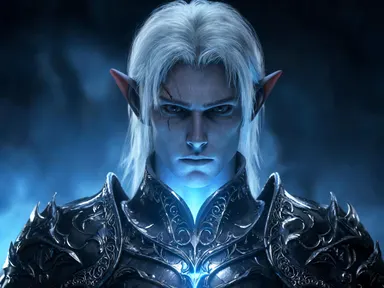
Elf Maker generates a fantasy elf portrait from a short character description and a single kindred choice. Pick one of eight kindreds, from a poised "High elf" noble to a cheerful "Workshop elf" ready for December, type a few words about the character you have in mind, and the app returns a detailed chest-up illustration with sharp facial features, clearly pointed ears, and a softly blurred setting behind them. It suits writers building a character reference, game players wanting a quick avatar, and anyone who wants a finished fantasy portrait without drawing skills.
How to use this app
- 1
Upload your file. There is no prompt you have to write.
- 2
Pick a look from the visual library, add a note of your own if you want one, then press Generate.
- 3
Watch your result appear in the gallery within moments.
- 4
Download, share, or generate again with a new idea.
What you can make
Tabletop character portraits
A player who wants a face for their character sheet can describe their ranger's scarred brow and braided beard, choose "Wood elf", and receive a finished portrait to print or share with the party before the next session.
Fantasy novel character references
An author writing a court intrigue arc can pin down how a noble antagonist looks by describing their cold expression and silver circlet, choosing "High elf", and keeping the result beside the manuscript as a visual anchor while drafting.
Festive seasonal graphics
For a December post, newsletter header or holiday card illustration, a creator can type a warm, rosy description and choose "Workshop elf" to get a cheerful pointed-hat portrait that fits a festive theme without needing a graphic designer.
Game master NPC library
A dungeon master building a port city campaign can generate distinct faces for recurring NPCs, using "Sea elf" for a harbour diplomat or "Dark elf" for a spy, and describing each one's distinguishing features in a line or two.
Avatar and profile art
Someone who wants a fantasy persona for an online community can describe their own preferred aesthetic, choose the kindred that fits the mood, and use the resulting portrait as a profile image that is polished and distinctive.
Shots to try
Tips for better results
Lead with the face
Because the portrait frames the character from the chest up with sharp focus on the face, details you type about eyes, skin markings, scars, or hair will show clearly. Broad statements about personality matter less than specific physical notes.
Let the kindred carry the setting
Each kindred, from the cold blue light of "Dark elf" to the orange fire glow of "Forge elf", brings its own lighting, palette and atmosphere. You do not need to describe the background; your text is most useful when it describes the character themselves.
Match kindred to story tone
The eight kindreds cover a wide emotional range. "Snow elf" and "Moon elf" read as ethereal and quiet. "Forge elf" and "Wood elf" read as grounded and practical. Choosing the kindred that fits your story's tone will make the result feel consistent with the world around the character.
Try a different kindred for the same character
If your character concept sits between two kindreds, generating the same description once under each is a reasonable way to compare. The same words produce noticeably different results under "High elf" versus "Dark elf", so the choice of kindred is as significant as what you type.
When to choose this app
Elf Maker is the right choice when you need a finished fantasy character portrait built entirely around a specific kindred and a short description, with no source image required. AI Book Cover is built for generating front cover artwork around a title and a chosen look, and AI Greeting Card puts typed words directly into card artwork. Neither is designed for the detailed, face-focused fantasy character illustration that Elf Maker produces, making it the clearest option for writers, players and creators who need a portrait rather than a cover or a card.
Frequently asked questions
Can I describe a character with dark or unusual skin tones and have them rendered accurately?
Yes. The app reads the physical details you type and applies them within the kindred you choose. Describing specific skin tones, markings or colouring in your text is the most direct way to steer the result toward the character you have in mind.
Will the portrait include the character's name or any text?
No. The portrait contains no writing of any kind: no name, no caption and no label. If you need the character's name displayed alongside the image, you would add it separately in an image editor or design tool after downloading the portrait.
Can I get a full-body portrait or a view of the character from behind?
Elf Maker generates chest-up portraits. It does not produce full-length figures, back views or multi-angle character sheets. The framing keeps sharp focus on the face and ears, which is where the most detail lands.
How specific should my description be?
A single clear sentence is enough to get a useful result. The most effective descriptions name physical specifics: eye colour, hair length and texture, visible marks or features. Vague mood words like 'mysterious' have less impact than concrete notes like 'narrow green eyes and a shaved undercut'.
Is the "Workshop elf" suitable for year-round use or only for December content?
The "Workshop elf" kindred is styled with a pointed felt hat, a festive colour palette and a toyshop setting, so it reads clearly as seasonal. It works best for December posts, holiday cards or festive campaigns. For year-round fantasy character work, one of the seven other kindreds will feel more at home.
Can two generations with the same description and kindred look identical?
Not reliably. The app introduces natural variation between generations, so two runs of the same text and kindred will share the general character of the description but will not be pixel-for-pixel copies. If a particular result works well, save it before generating again.
How much does it cost?
Each generation costs 1 credit. New accounts get free credits to try it out.
Do I need any editing skills?
No. Upload your photo, pick the look you want from the library, and the app writes the full instruction for you behind the scenes. There is nothing to install and nothing to configure. A small optional box lets you add one line in your own words, but the app works without it.
Can I use the results commercially?
Yes. Content you generate is yours to use, subject to our content licenses.
How long does a generation take?
Most generations finish in under a minute, and you can watch progress live in the gallery.