Made with this app
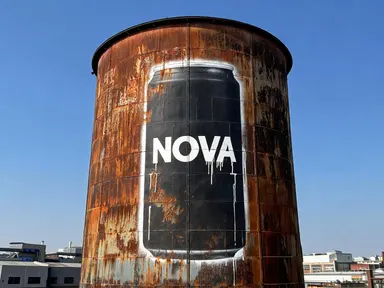
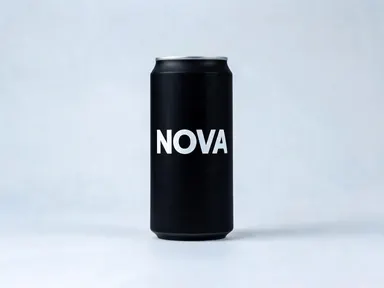
Graffiti Ad AI Generator takes a single product photograph and turns it into a large-scale street art mural, photographed in place on a real surface you choose from the library. The result is not a product standing in front of a wall: it is the wall, with the piece on it, paint texture, overspray, drips and all. It is built for brand marketers, creative directors, packaging designers and social media teams who want a street-level visual without a shoot permit or a spray can.
How to use this app
- 1
Upload your file. There is no prompt you have to write.
- 2
Pick a look from the visual library, add a note of your own if you want one, then press Generate.
- 3
Watch your result appear in the gallery within moments.
- 4
Download, share, or generate again with a new idea.
What you can make
Campaign concept visuals
A marketing team wants to pitch an outdoor campaign for a new drink brand. They upload the can packshot, pick "Brick Side Wall", and walk into the meeting with a full-scale mural visual that reads like a real location photograph, brand name legible from across the frame.
Social media content for product launches
A streetwear brand drops a new fragrance and needs editorial imagery fast. They upload the bottle on a plain background, choose "Shop Shutter", and get a night-lit corrugated mural that fits natively into an urban-lifestyle Instagram grid.
Packaging design reviews
A designer wants to see how a rebrand reads at scale before final sign-off. Uploading the new pack and selecting "Freight Wagon" shows exactly how the colour blocking and the brand name hold up when the proportions are stretched across a full wagon flank.
Pitch decks and mood boards
An agency building a brand world for a client needs gritty, location-grounded references. Cycling through "Underpass Pillar", "Skate Bowl" and "Water Tower" produces three distinct environmental contexts from one packshot, ready to drop straight into a presentation.
Limited-edition or collab artwork
A product team is planning a graffiti-artist collab and wants to explore the aesthetic before commissioning. The "Stencil Door" tile produces a crisp two-colour stencil read of the product that makes the conversation with the artist immediate and concrete.
Shots to try
Tips for better results
Start with a clean packshot
The app reads the product's shape, proportions and colour from your photograph. A single product centred on a plain or white background gives it everything it needs. A busy shelf scene, a product partly out of frame or a very small object in a wide shot all reduce the accuracy of the mural.
Match the tile to the brand mood
Each library tile sets the entire environment: light, surface, time of day and scale. "Water Tower" places the piece high above an industrial skyline in hard daylight. "Shop Shutter" puts it on a night street under a single lamp. Choose the surface that fits the brand world, not just the one that looks dramatic.
Use the optional text box for specific details
After picking a tile you can add one small instruction in the box below the library: a particular accent colour, a request to keep the background very dark, or a note about a detail in your product. Keep it short and focused on one thing: the tile already defines the surface, the light and the overall treatment.
Think about what the brand name will do
The app carries the large wording printed on your product into the mural and paints it at a size that reads from across the image. If your packshot shows the brand name clearly and at a good size, that name will anchor the mural. Fine back-of-pack text is not carried over, so the result emphasises the primary mark.
When to choose this app
Pick Graffiti Ad AI Generator when you need your product translated into a real painted environment, where the surface, the light and the texture of the wall are part of the image. AI Logo Mockup Generator places your artwork unchanged onto objects and shopfronts. AI Food Photography moves a dish into a chosen shooting context. Neither of those is trying to do what this app does: take the product itself and render it as the mural, so the brick, steel or concrete becomes the canvas and the brand name is painted into it.
Frequently asked questions
Does the app preserve the exact colours of my product in the mural?
The app carries the product's dominant colours and overall colour blocking into the paint. Because the result is lit by the environment you chose, a warm afternoon wall reads warmer than a night shutter. The hues stay recognisably yours, but they live inside the light of the scene rather than against a neutral background.
Which surfaces are available and can I combine two of them?
The library offers seven distinct surfaces: "Brick Side Wall", "Shop Shutter", "Underpass Pillar", "Freight Wagon", "Skate Bowl", "Water Tower" and "Stencil Door". Each generation uses one tile. To compare two surfaces you would run the app twice, once with each tile selected.
Can I add a slogan or a campaign line to the mural?
The mural carries the wording that is printed on the product itself, painted at a readable scale. It does not add any other text: no slogan, no caption, no tag and no signature. The optional text box is for small visual details, not for introducing new words into the image.
Does the product appear as a real object standing in front of the wall?
No. The result is a wall with the piece on it. There is no physical product in the frame: the shape, proportions and colour of your product are carried entirely in the paint on the surface. That is what makes it read as a genuine mural photograph rather than a composited mockup.
What file types can I upload and are there any size recommendations?
The app accepts JPG, PNG, WebP or GIF files, dragged in or picked from your device. For the strongest result, use a file where the product fills most of the frame and is photographed against a plain, uncluttered background. A larger, well-lit file gives the app more to work with when building the mural.
How much does it cost?
Each generation costs 1 credit. New accounts get free credits to try it out.
Do I need any editing skills?
No. Upload your photo, pick the look you want from the library, and the app writes the full instruction for you behind the scenes. There is nothing to install and nothing to configure. A small optional box lets you add one line in your own words, but the app works without it.
Can I use the results commercially?
Yes. Content you generate is yours to use, subject to our content licenses.
How long does a generation take?
Most generations finish in under a minute, and you can watch progress live in the gallery.