Made with this app
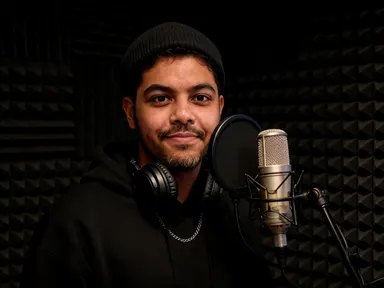
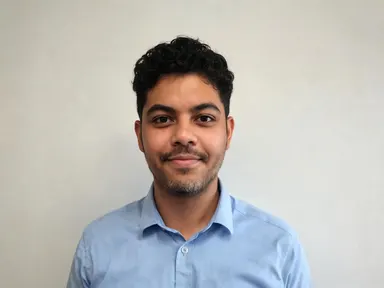
Studio Rapper AI Generator takes a single photo of a person and places them inside a working recording studio, styled and lit as though a professional music press photographer was in the room. Upload a clear photo, pick a location from the library, and the app builds the scene around the face it finds: same features, same skin tone, same hair, dressed for the session. It is built for musicians, content creators and anyone who needs a press-ready portrait without booking a studio.
How to use this app
- 1
Upload your file. There is no prompt you have to write.
- 2
Pick a look from the visual library, add a note of your own if you want one, then press Generate.
- 3
Watch your result appear in the gallery within moments.
- 4
Download, share, or generate again with a new idea.
What you can make
Artist Press Kit Portrait
An independent musician needs a compelling portrait for their press kit but cannot afford a studio booking. Upload a clear headshot, choose "Vocal Booth", and the app returns a warmly lit, shallow-focus press photograph with the artist behind a condenser microphone, ready to send to blogs and promoters.
Social Media Artist Branding
A producer wants consistent visual identity across their streaming profiles and social channels. Picking "Mixing Desk" places them over a full console with monitor speakers and a blue-tinted control room, giving every platform the same polished, behind-the-scenes editorial look.
Album or EP Announcement Visual
For an upcoming release, an artist needs an atmospheric announcement image without a shoot day. "Tape Room" surrounds them with vintage outboard gear and glowing indicator lights, creating a moody, warm image that reads as a serious studio session.
Atmospheric Profile on a Budget
A rapper building their first online presence wants something beyond a phone selfie. "Roof At Night" puts them on a rooftop against a lit cityscape with a doorway light on their face, producing a cinematic editorial portrait that holds its own alongside major-label imagery.
Content for Live Event Promotion
A promoter needs artist imagery for a poster without waiting on the act to deliver photos. A clear promotional headshot, passed through the "Live Room" option, returns a spacious, daylit studio portrait that works at scale on flyers and digital banners.
Shots to try
Tips for better results
Lead With a Strong Photo
The app rebuilds the studio around the face it finds, so the sharper and more front-facing the uploaded photo, the closer the result reads to the real person. A well-lit chest-up or closer shot in natural light gives the strongest likeness every time.
Match the Room to the Music
Each library tile sets a distinct mood. "Tape Room" reads vintage and analogue; "Roof At Night" reads cinematic and urban; "Live Room" reads raw and energetic. Think about where the image will appear and which setting fits the sound before choosing.
Use the Optional Box for Small Details
The optional text field under the library is the right place for one specific addition, such as a jacket colour, a cap or a request to leave out a certain item. It is not for changing the room or requesting text in the image: the library tile handles the scene.
Try Two or Three Settings
Different library choices produce very different images from the same uploaded photo. Running the same portrait through "Vocal Booth" and then "Studio Lounge" gives you two distinct press photographs with different moods, useful for different platforms or campaign moments.
When to choose this app
Studio Rapper AI Generator does one thing with real precision: it takes a person's face and puts it inside a credible music studio setting, styled and lit as a press photograph. If the job is transforming a room rather than a person, AI Room Converter does that with architecture. If the task is putting a garment on a model rather than an artist in a studio, AI Fashion Model handles that instead. When the output needed is a portrait of a specific, recognisable person in a recording environment, this app is the direct choice.
Frequently asked questions
Does the app keep my face looking like me?
Yes. The app reads your facial features, proportions, skin tone and hair from the uploaded photo and carries all of them into the result. The studio, the lighting and the clothing change; your face does not. A clear, front-facing photo taken close to chest height gives the most consistent likeness.
Can I choose what the person is wearing in the result?
The app styles the subject in studio-appropriate clothing: hoodies, bomber or varsity jackets, plain heavy tees, caps, beanies or headphones around the neck. You cannot specify an outfit in full, but you can use the optional text box to request a detail such as a specific jacket colour or a cap.
Will the result include any text, logos or album art?
No. The app produces images with no writing of any kind: no name, no album title, no brand mark on the gear, and nothing readable on any screen that appears in the room. This is fixed behaviour and the optional text box cannot override it.
Can I use a group photo or a photo where my face is small?
The app works best from a photo of one person shown clearly from the chest up or closer. A group photo introduces other faces the app cannot ignore, and a very small face in a wide shot gives the app less information to work from, which weakens the likeness in the result.
What does the optional text box actually do?
It lets you add one small, specific instruction on top of the library choice you have already made: a preferred jacket colour, a request to keep a particular accessory, or something you would like left out of the scene. The library tile still controls the room; the text box is for fine detail only.
How is this different from just editing my photo in a standard image editor?
A standard editor moves or masks pixels from the photo you give it. Studio Rapper AI Generator builds an entirely new scene around your face, generating a recording studio environment, studio clothing, press-style lighting and film grain from scratch, while keeping your actual features consistent throughout.
How much does it cost?
Each generation costs 1 credit. New accounts get free credits to try it out.
Do I need any editing skills?
No. Upload your photo, pick the look you want from the library, and the app writes the full instruction for you behind the scenes. There is nothing to install and nothing to configure. A small optional box lets you add one line in your own words, but the app works without it.
Can I use the results commercially?
Yes. Content you generate is yours to use, subject to our content licenses.
How long does a generation take?
Most generations finish in under a minute, and you can watch progress live in the gallery.