Made with this app
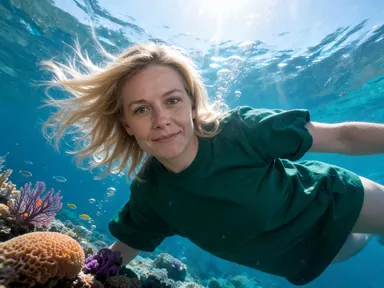
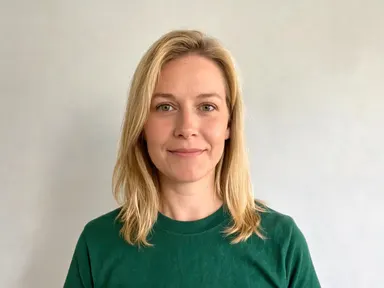
Underwater AI Generator takes a single portrait photograph and places the person from it beneath the surface of the water you choose from its visual library. Upload a clear photo, pick a tile, and the app produces a calm, fully submerged scene where hair lifts, clothing billows and light comes down in shafts from above, with the person's face kept recognisably their own. It suits portrait photographers, content creators and anyone who wants a striking environmental image without a dive tank or a film crew.
How to use this app
- 1
Upload your file. There is no prompt you have to write.
- 2
Pick a look from the visual library, add a note of your own if you want one, then press Generate.
- 3
Watch your result appear in the gallery within moments.
- 4
Download, share, or generate again with a new idea.
What you can make
Portrait series with a theme
A photographer shooting a cohesive editorial set can run several different subjects through the same tile and get portraits that share a mood and a palette. The consistent lighting logic of each scene holds the series together even though each person looks entirely like themselves.
Social profile imagery
Someone who wants an unusual but composed profile picture can upload a clean headshot, pick "Deep Blue" for a minimal nothing-but-ocean background, and get an image that stands out in a feed without looking manipulated or chaotic.
Fantasy and concept art for personal projects
Writers, game designers or world-builders who want a reference image of a specific real person in a specific underwater environment, a limestone cave or a shipwreck, get a photorealistic result they can use as a mood board or character study.
Campaign visuals for aquatic brands
A swim school, a diving centre or a skincare brand with a water theme can shoot a model in a studio, upload that portrait, choose "Coral Reef" or "Pool Blue", and get a campaign-ready image without booking a pool or a film crew.
Gift or keepsake prints
A parent, partner or friend can upload a photo of someone they know and produce a fine-art style underwater portrait as a printed gift. The calm, unhurried mood of the image and its high resolution output make it suitable for printing at a large size.
Shots to try
Tips for better results
Start with a clear face
The app keeps your features, skin tone and hair colour as they are. The stronger the likeness in the source photograph, the stronger it will be in the result. A sharp, evenly lit image showing the face from the chest up gives the app the most to work from.
One person, one photo
Upload a photograph of one person shown clearly. A group photo or a picture where the face is small in the frame gives the app less to hold onto, and the likeness in the result will be weaker. A solo portrait is always the right starting point.
Use the tile to set the mood
The library tile is the main creative decision. "Cave Pool" is still and minimal; "Coral Reef" is bright and busy; "Shipwreck" is dim and textured. Decide the feeling you want before you pick, because the water, the light and everything around the person all come from that single choice.
Use the free text box for small details
The optional box under the library is for one focused addition, a particular clothing colour, a detail you want kept or something you want left out. Keep it short and specific. The tile has already set the scene, so the box works best for small refinements rather than broad directions.
When to choose this app
Underwater AI Generator is built around a single subject: placing one real person, with their own face intact, into a water environment. If your goal is to transform a space rather than a person, AI Room Converter takes a room photo and refits it while keeping every wall, window and door in place. If you want to change what is behind an outdoor scene rather than who is in it, AI Sky Replacement swaps the sky and shifts the light across the whole image to match. When the picture is about the person, their face and their presence in a specific underwater world, this app is the one built for that job.
Frequently asked questions
Will the person in the result actually look like the person in my photo?
Yes. The app is built to carry the person's facial features, proportions, skin tone and hair colour into the result. A well-lit, sharp portrait where the face is clearly visible from the chest up gives the strongest likeness. Softer or smaller source photos produce a recognisable result but with less precision.
Can I choose what the person wears in the underwater scene?
The app keeps whatever the person is wearing in the source photo and lets it drift and billow naturally in the water. You can use the free text box to specify a colour or a clothing detail you want emphasised, but the app does not change the garment itself. What they wear in the photo is what they wear underwater.
What happens to the background I uploaded?
Only the person is carried into the result. The original background, whether it is a plain wall, an outdoor scene or a studio setup, is replaced entirely by the underwater environment set by your library choice. The focus is the person, not where they were photographed.
Can I add text, a name or a date to the finished image?
The app does not place any text, lettering, numbers or logos anywhere in the image, and the free text box will not change that. If you need a caption or a watermark added, that would need to be done in a separate editing tool after you have saved the result.
Can I use the same photo with several different library tiles?
Yes. Uploading the same portrait and trying two or three different tiles is a straightforward way to find the environment that suits the image best. Each tile produces a distinct scene, from the bright open water of "Coral Reef" to the total stillness of "Cave Pool", so the same person can read very differently across them.
Does the person need to be posed as if they are swimming?
No. The app handles the sense of weightlessness through floating hair, drifting clothing and the body's position in the water. You do not need a swimming pose in the source photo; a standard portrait or headshot is the right input, and the app produces the underwater feeling from there.
How much does it cost?
Each generation costs 1 credit. New accounts get free credits to try it out.
Do I need any editing skills?
No. Upload your photo, pick the look you want from the library, and the app writes the full instruction for you behind the scenes. There is nothing to install and nothing to configure. A small optional box lets you add one line in your own words, but the app works without it.
Can I use the results commercially?
Yes. Content you generate is yours to use, subject to our content licenses.
How long does a generation take?
Most generations finish in under a minute, and you can watch progress live in the gallery.