Made with this app
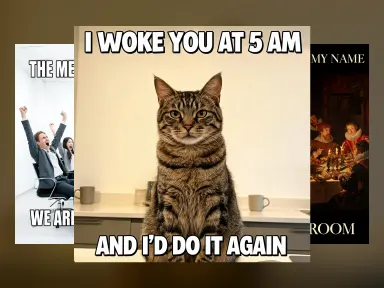
AI Meme Generator draws the picture and writes your words into it in one pass. Pick one of twelve setups, from a tabby cat staring flatly into the camera to office workers overacting a celebration to a Renaissance banquet where one figure has turned to look at you, then type the top line and the bottom line. The words are generated as part of the image, not pasted over it afterwards, so there is no separate caption step and nothing to export into another editor. Nothing is uploaded.
How to use this app
- 1
Upload your file. There is no prompt you have to write.
- 2
Pick a look from the visual library, add a note of your own if you want one, then press Generate.
- 3
Watch your result appear in the gallery within moments.
- 4
Download, share, or generate again with a new idea.
What you can make
A reaction post without a stock template
Everyone recognises the handful of macro templates that have been reused for fifteen years, and reusing one marks a post as generic. Picking "Staring cat" or "Night raccoon" gives the same flat deadpan setup drawn fresh, so the joke reads instantly but the picture has not been seen before.
Internal jokes for a team channel
"Office meeting" and "Up late" are the two setups most work jokes need: a room full of people overreacting, and one person alone lit only by a laptop. Type the situation on the top line and the punchline on the bottom, and the result is ready to drop into a channel without opening a design tool.
Captioned art for a slower joke
The "Painted and printed" group makes the setup an artefact rather than a snapshot: an oil painting, an illuminated manuscript page, a mock motivational poster. The lettering changes with them, into serif or blackletter, so the finished image looks like a caption that belongs to the object rather than one stuck on top of it.
Ad copy tested as a joke first
A marketer with two candidate taglines can put each one on the same setup for the price of two generations and see which reads faster at the size a feed actually shows it. The setup is held constant, so the only thing being compared is the wording.
A square image that fits everywhere
The default is square because that is the shape a meme is shared in, but the aspect control stays visible. A joke built around a tall scene or a wide one can be switched before generating rather than cropped afterwards.
Shots to try
Tips for better results
Short lines are set larger
Each box takes up to 34 characters, and that is a ceiling rather than a target. A few words come back set in huge type across the band; a full sentence makes the model shrink the letters to fit, which is the same as unreadable at the size a meme is actually viewed.
Type it exactly as you want it drawn
The case you type is the case that is drawn, so CAPITALS come back as capitals and sentence case comes back as sentence case. Apostrophes and ordinary punctuation are set exactly as typed. Accents are a different matter, and so is any alphabet this model has not been measured drawing exactly: the app warns as soon as one is typed. Chinese, Thai, Russian and Ukrainian were measured and are drawn exactly, so a caption in one of those is never warned about.
The tile is the setup, so pick it for the reaction
The twelve setups are chosen for what expression is in them rather than what animal or object is in them: a flat stare, a caught-in-the-act freeze, a room overreacting, a person face down on a gym floor. Read them as the first half of the joke and the two lines write themselves.
Nothing else is written into the picture
The app asks for no other words anywhere in the image: no watermark, no handle, no hashtag, no logo and no third line. If a stray word does appear, generating again clears it, and it is not something the text boxes can be used to remove.
When to choose this app
AI Meme Generator draws the caption as part of the image, which is the step every other route makes you do yourself. A general text-to-video or text-to-image model will give you the picture and leave you to open a separate editor to lay type over it, and that second step is where a meme stops being a thirty second job. Here the words are part of the generation, and they were measured on this model: every probe render set both lines verbatim, apostrophes included. The library is also deliberately original rather than a set of famous templates, which means nothing here is a photograph somebody owns or a person who did not agree to be a punchline. If you want your own face or your own photo in the picture, this is not the app, because it takes no uploads; AI Greeting Card and AI Book Cover are the two neighbours that also write your words into an image, for cards and covers respectively.
Frequently asked questions
Is the text really drawn into the image?
Yes. The two lines are part of the generation, not laid over the finished picture, which is why they sit on the artwork rather than floating above it. It also means the lettering matches the setup: Impact style capitals on the animal tiles, serif on the poster and painting, blackletter on the manuscript.
Do I need to upload a photo?
No. Nothing is uploaded, and there is nothing to find or crop first. You pick a setup from the grid, type the top line and the bottom line, and press the button. The picture is drawn along with the words in one pass.
Can I use a famous meme template?
No, and that is deliberate. All twelve setups here were written for this app rather than copied, because the recognisable templates are photographs somebody owns and people who never agreed to appear in them. The setups cover the same ground: a deadpan animal, a room overreacting, a person alone at night, a mock motivational poster.
Why are the lines limited to 34 characters?
Because that is where this model reliably sets a line exactly as typed and at a size you can read. Longer strings make any image model shrink the type or alter a word. Two short lines are also what an image macro is: a setup and a turn, not a paragraph.
Will it write my language?
Plain Latin letters, numbers and ordinary punctuation come back exactly as typed. Accented letters can come back with a mark dropped, moved or invented. Other alphabets are not all alike, and each one named here was fired at this model rather than assumed: Chinese, Thai, Russian and Ukrainian come back exactly as typed, so a caption in one of those is never warned about. Arabic, Hebrew, Hindi, Bengali and Korean come back mangled. Japanese is the split case, because kanji and ordinary Japanese words are set correctly but an English word written in katakana is not. Any alphabet that has not been fired here is warned about by default, since unmeasured is not the same as safe. The warning arrives as soon as you type rather than after the credit is spent, and you can still generate.
What shape is the result?
Square by default, because that is the shape memes are shared in. The aspect control stays visible, so you can switch to a tall or wide frame before generating if the joke needs one. Each attempt is charged at the cost shown on the button.
How much does it cost?
Each generation costs 1 credit. New accounts get free credits to try it out.
Do I need any editing skills?
No. Upload your photo, pick the look you want from the library, and the app writes the full instruction for you behind the scenes. There is nothing to install and nothing to configure. A small optional box lets you add one line in your own words, but the app works without it.
Can I use the results commercially?
Yes. Content you generate is yours to use, subject to our content licenses.
How long does a generation take?
Most generations finish in under a minute, and you can watch progress live in the gallery.