Made with this app
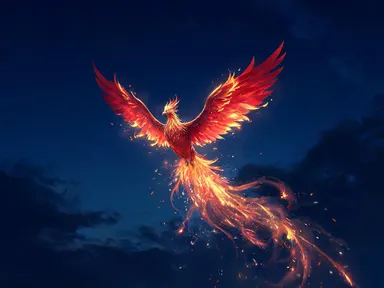
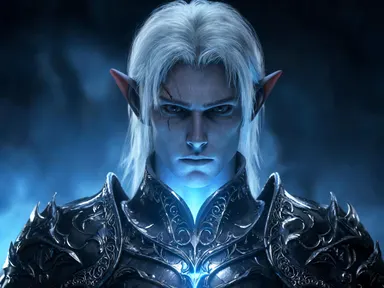
Mythical Creature Generator produces a full-body fantasy illustration of one of eight legendary creatures, set in a landscape that suits it, rendered at up to 1K+ resolution. You pick the creature tile, type a short description of how yours looks or feels, and the app builds the rest. It suits fantasy writers, game designers, educators, and anyone who wants finished creature art without drawing skills or complicated prompts.
How to use this app
- 1
Upload your file. There is no prompt you have to write.
- 2
Pick a look from the visual library, add a note of your own if you want one, then press Generate.
- 3
Watch your result appear in the gallery within moments.
- 4
Download, share, or generate again with a new idea.
What you can make
Character Art for Fantasy Writers
A novelist who needs a visual anchor for a creature in their story can pick "Dragon" and type a color, a mood, or a distinguishing feature. The result gives them a concrete reference image that matches the creature's role in the narrative, useful for cover briefs or personal mood boards.
Tabletop Game Encounter Cards
Game masters building homebrew encounters can generate a "Kraken" rearing from a storm sea or a "Chimera" on scorched ground and print the image for a handout or a screen prop. Each illustration frames the whole creature clearly, making the identity unmistakable at the table.
Classroom Mythology Visuals
Teachers covering world mythology can generate a "Nine tailed fox" among red torii gates or a "Thunderbird" above dark plains to accompany a lesson. The images show the creature as its popular legend imagines it, giving students a vivid starting point for discussion and research.
Fantasy Digital Art Reference
Illustrators who want a compositional starting point for their own work can generate a "Griffin" with wings half spread or a "Phoenix" trailing embers and study the pose, lighting, and proportions before drawing their own version by hand or digitally.
Social Media Fantasy Content
Creators running fantasy-themed accounts can publish a fresh "Unicorn" in a misty forest clearing or a "Thunderbird" with lightning forking from its wings as standalone content. The dramatic natural lighting and landscape setting make each image ready to share without further editing.
Shots to try
Tips for better results
Name One Defining Detail
The app already places the creature correctly and sets its landscape. Your short entry works hardest when it adds one specific visual detail, such as a color, a texture or an unusual feature, rather than repeating what the tile already delivers. One clear detail shapes the whole image more reliably than a list.
Use Color to Set the Mood
Color is the fastest way to shift the emotional register of a creature portrait. Typing a color pair, such as "copper and jade" for a "Griffin" or "deep violet and silver" for a "Unicorn", pushes the result toward a specific atmosphere without touching the creature's form.
Let the Tile Handle the Landscape
Each tile carries its own setting: the "Kraken" is already in a storm sea, the "Thunderbird" already above dark plains. Describing a conflicting landscape in your entry tends to pull the image in two directions. Focus your words on the creature itself and trust the tile to place it.
Try Mood Words Alongside Visual Ones
Words like "ancient", "serene", "wounded" or "newly born" are valid entries and shift the painted atmosphere as clearly as a color name does. The app interprets them through lighting, posture and expression, so mood language is a practical tool, not just a creative indulgence.
When to choose this app
Mythical Creature Generator is the right choice when you want a finished, standalone portrait of a legendary creature in its natural setting, with nothing else in the frame. If you need finished artwork that incorporates text, such as a title and author name on a front cover, AI Book Cover is built for that. If you want card artwork with words drawn directly into the image, AI Greeting Card handles that. This app's focus is the creature itself: full body, dramatic light, no text and no distractions.
Frequently asked questions
Can I get a creature that does not appear in the eight tiles, such as a basilisk or a leviathan?
The app draws the eight creatures named in its tiles. Each tile calls a specific creature and the app builds from that. For a creature outside that set, the monster generator is the better tool, as it is designed for open-ended creature invention.
Will the app add the creature's name or any label to the image?
No. The app produces a pure illustration with no text of any kind on it, no name, no caption and no watermark. If you need a labelled plate or a trading-card layout with the creature's name written into the artwork, that is outside what this app does.
Can I get two creatures in the same image, or a creature with a rider?
The app places one creature alone in its landscape. It does not draw a second creature alongside the first, a person for scale, or a rider on the creature's back. The composition is always a single creature in clear space, which keeps the portrait focused and uncluttered.
How specific can my short entry be?
Quite specific, as long as it describes the creature's appearance or mood rather than the setting or the composition. A precise color, a surface texture, a scar, a particular expression or a mood word all translate reliably. Descriptions of background scenery tend to conflict with what the tile already sets.
Does the illustration reflect a specific cultural tradition for each creature?
It draws from the broad popular picture of each legend rather than from any single culture's telling. Traditions disagree with each other about creatures like the nine tailed fox and the thunderbird, so treat the result as a fantasy illustration rather than a culturally specific reference image.
Can I use the image as a starting point for a creature of my own invention?
The image makes a useful visual reference or mood-board starting point, and you are free to build your own work from it. The app itself is designed for the eight named creatures and will always render one of them, so any further invention happens in your own creative process after the image is in your hands.
How much does it cost?
Each generation costs 1 credit. New accounts get free credits to try it out.
Do I need any editing skills?
No. Upload your photo, pick the look you want from the library, and the app writes the full instruction for you behind the scenes. There is nothing to install and nothing to configure. A small optional box lets you add one line in your own words, but the app works without it.
Can I use the results commercially?
Yes. Content you generate is yours to use, subject to our content licenses.
How long does a generation take?
Most generations finish in under a minute, and you can watch progress live in the gallery.