Made with this app
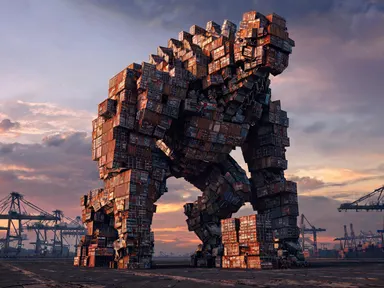
AI Monster Generator turns a short description and one archetype choice into a full-body creature rendered in detailed concept art. Pick one of eight archetypes, from the towering "Kaiju" to the impish "Gremlin", type a few words about the details you want, and the app produces an original monster you have never seen before, dramatically lit and textured at up to 1K resolution. It suits game designers, authors, illustrators and anyone who needs a creature that exists nowhere else.
How to use this app
- 1
Upload your file. There is no prompt you have to write.
- 2
Pick a look from the visual library, add a note of your own if you want one, then press Generate.
- 3
Watch your result appear in the gallery within moments.
- 4
Download, share, or generate again with a new idea.
What you can make
Tabletop Game Creature Design
Game masters and indie designers who need original creature art for campaigns or rulebooks can describe a specific trait, choose an archetype like "Bone construct" or "Mechanical beast", and get a finished concept-art illustration ready to drop into a document or print for a session.
Fiction and Worldbuilding Reference
Writers building a fantasy or science-fiction world can generate a visual reference for a creature they have only described in prose. Choosing "Cosmic horror" or "Swamp thing" and adding a few distinctive details gives the imagination something solid to write from.
Character Concept Sketching
Concept artists who want a fast starting point for a creature design can use the app to explore how an idea looks across different archetypes. Trying "Kaiju" then "Mechanical beast" with the same description produces two distinct directions without touching a pencil.
Novelty and Collectible Art
Anyone who enjoys creature art for its own sake can use the generator to build a personal collection of original monsters. Because the app invents rather than recalls, every result is genuinely unique, even when the same description and archetype are used twice.
Video Game Pitch Visuals
Small studios pitching a creature-heavy game can populate a mood board or pitch deck with original monster concepts. The consistent concept-art rendering style keeps a set of "Slime", "Gremlin" and "Cute and fuzzy" results looking like they belong to the same project.
Shots to try
Tips for better results
Let the Archetype Do the Heavy Lifting
Each tile already defines the creature's basic form, material and lighting. Your text works best when it adds a specific detail the archetype does not cover: a colour, a texture, a distinctive feature or a mood. Describing the entire creature from scratch competes with the archetype rather than sharpening it.
Be Specific About One or Two Traits
A focused entry like "scales like hammered copper, single central eye" produces a more distinctive result than a long list of adjectives. The app renders one creature alone, so every word you type has space to influence the final look without crowding it.
Match the Archetype to the Mood You Need
The archetypes span a wide tonal range. "Cute and fuzzy" and "Gremlin" produce creatures that read as playful; "Cosmic horror" and "Bone construct" lean toward dread. Choosing the archetype that matches the emotional register you want gives the app a clear direction before your description even starts.
Try the Same Description Across Two Archetypes
Because the app invents rather than looks anything up, running the same description under "Swamp thing" and then "Mechanical beast" produces two genuinely different creatures. This is a practical way to find which direction suits a project without writing a new brief each time.
When to choose this app
AI Monster Generator is the right choice when you need a wholly invented creature rendered as finished concept art, with no source material or uploaded reference required. AI Wallpaper picks a look and composes a phone wallpaper, while AI Book Cover turns a title into a finished front cover: neither is built to produce a standalone creature character. AI Emoji Generator is optimised for simple, small-format icons. When the job is a single original monster, fully detailed and dramatically lit, this app is purpose-built for exactly that.
Frequently asked questions
Will two people who type the same description get the same monster?
No. The app invents a creature from your description rather than retrieving a fixed one, so two identical entries produce two different results. That is a deliberate feature: every monster is original. If you want a creature tied to a specific legend or canonical design, a mythical creature app is better suited to that job.
Can I put the monster's name or any stats on the image?
The app does not add any writing to the picture, and text entered in the description box influences the creature's appearance, not a caption. The result comes back as pure creature art with no words, numbers or labels of any kind. If you need the name on the image, it would need to be added afterwards in separate design software.
How do the eight archetypes actually differ?
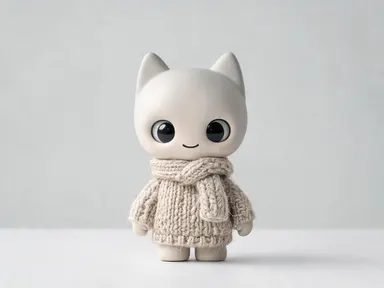
Each tile sets the creature's fundamental nature: its scale, material, silhouette and lighting environment. "Kaiju" produces something enormous and armoured; "Slime" gives you a translucent dripping form; "Cute and fuzzy" shifts the whole image toward softness and charm. Your description then steers the specific details within whichever nature you chose.
Can I generate a monster that includes a person or another creature for scale?
The app renders one creature alone in the frame. It does not add a person, a rider or a second monster, so the image will not show a scale comparison. The creature is composed and framed to communicate its own size and character without a figure beside it.
What makes one monster description work better than another?
Specific visual details outperform mood words. Writing "obsidian spines" or "fur the colour of old paper" gives the app something concrete to render. Words like "scary" or "powerful" are harder to translate into visible features. One or two precise traits will shape the result more reliably than a long list of general adjectives.
Is the output resolution suitable for print use?
The app produces images at up to 1K resolution, which works well for digital presentations, mood boards, pitch decks and screen display. For large-format print, the file may need upscaling in a dedicated tool afterward. The concept-art rendering style is detailed enough to support that kind of post-processing without looking sparse.
How much does it cost?
Each generation costs 1 credit. New accounts get free credits to try it out.
Do I need any editing skills?
No. Upload your photo, pick the look you want from the library, and the app writes the full instruction for you behind the scenes. There is nothing to install and nothing to configure. A small optional box lets you add one line in your own words, but the app works without it.
Can I use the results commercially?
Yes. Content you generate is yours to use, subject to our content licenses.
How long does a generation take?
Most generations finish in under a minute, and you can watch progress live in the gallery.