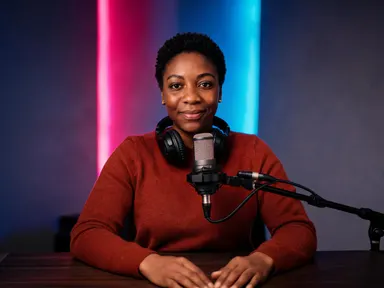
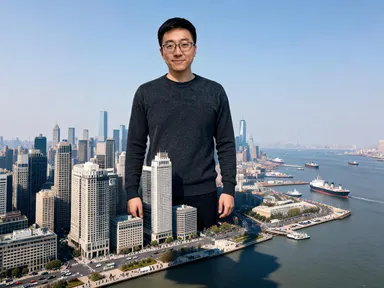
Made with this app
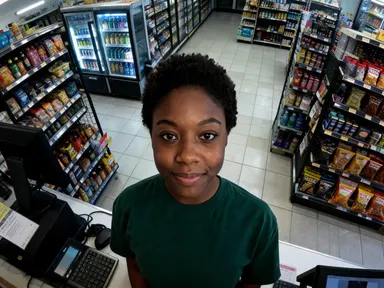
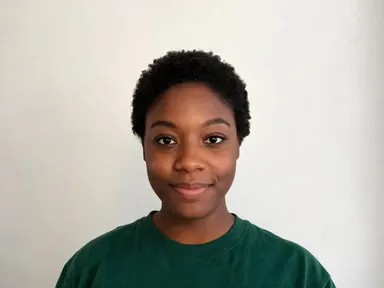
CCTV AI Generator takes one photograph of you and returns it as a still from a fixed security camera, looking down at you from high in the corner of a room. Your face is kept as it is: the same features, skin tone, hair colour and hairstyle, and kept sharp enough to recognise. What changes is the camera, the wide angle looking down, the harsh available light, the washed out colour and the sensor grain. Eight tiles choose the place the camera is watching: a late night shop counter, an underground car park, a lift lobby, a front door, an office corridor, a petrol station forecourt, a stairwell or a warehouse floor. No timestamp is burned into the corner.
How to use this app
- 1
Upload your file. There is no prompt you have to write.
- 2
Pick a look from the visual library, add a note of your own if you want one, then press Generate.
- 3
Watch your result appear in the gallery within moments.
- 4
Download, share, or generate again with a new idea.
What you can make
A picture that looks like it was not meant to be taken
Everything else on your camera roll was posed. The whole appeal here is a frame nobody set up, shot from an angle no person would choose, and it reads that way instantly because the height and the wide lens are the two things a phone can never do.
Thumbnails and covers with a found footage feeling
Creators making mystery, true crime or horror content need a face that looks recovered rather than photographed. A portrait of yourself under a corridor ceiling or a petrol station canopy gives that without borrowing a frame from somebody else's footage.
Story and film artwork
Writers and filmmakers who want a character sheet in the language of surveillance can run the same person across several tiles and get one figure seen by eight different cameras, which is how that kind of story is usually told.
Profile pictures with a very specific joke
A friend rendered as the last known sighting of themselves is a good avatar and a better group chat picture. It lands because the face is clearly theirs; the app keeps the likeness sharp even though the rest of the frame is deliberately degraded.
Seeing what a room does to a face
The eight places are really eight bad lights: a strip lit car park, a caged stairwell bulb, the white pool under a petrol canopy, the shafts through a warehouse roof. Choosing between them is the main thing the tiles are for.
Shots to try
Tips for better results
The face stays sharp on purpose
Real footage is unusable because the face is a smear, so this app degrades everything except the likeness. Colour is washed out, grain is visible and the corners go soft, but the features stay readable, which is why a sharp evenly lit photograph from the chest up still matters.
Choose the tile for the light and the height
The eight places differ most in how high the camera is and what is lighting the room. The front door tile is barely above head height and very close; the warehouse tile is up in the roof and very far. Deciding how close you want to be makes the choice quick.
There is no date in the corner
The burned in timestamp is the single most recognisable thing about security footage and the app leaves it out deliberately, along with every other character. A picture with a fake date in it cannot be cropped or printed cleanly, and any lettering you want is better added afterwards.
Keep the instructions box for small details
The tile fixes the place, the camera height and the light, so the optional box works best for small additions such as a coat colour or a detail you want kept. Describing a different location in the box pulls against the tile instead of replacing what it set.
When to choose this app
CCTV AI Generator is the right choice when the camera is the point: a high wide angle you cannot shoot yourself, harsh available light and the grain of a still nobody composed. AI Camera Angle Changer reshoots a real subject from a new viewpoint while keeping the photograph clean, and AI Photo Restoration runs the other way entirely, removing the grain and the damage rather than adding it. Against Paparazzi AI Generator on this platform, this one is a camera that was already there rather than one that came looking for you.
Frequently asked questions
Will the result look like me?
Yes. The app keeps your facial features, skin tone, hair colour and hairstyle as they appear in the photograph you upload, and keeps the face sharp enough to recognise. The washed out colour, the grain and the soft corners are applied to the rest of the picture rather than to your face.
Is there a timestamp on the image?
No, and that is deliberate. Real footage burns a date and a time into a corner, but the app is told to leave out every number, date, time and counter along with all other lettering. A picture with a fake timestamp cannot be cropped or printed cleanly, so anything you want written on it is yours to add afterwards.
Can I choose where the camera is watching?
Yes, and it is the main choice on the page. Eight tiles cover a late night shop counter, an underground car park, a lift lobby, a front door, an office corridor, a petrol station forecourt, a stairwell and a warehouse floor. Each tile sets the place, the height of the camera and the light together.
Does anything happen in the picture?
No. It is a picture of a person, not an incident. There is no weapon anywhere in the frame, nobody is being hurt, and there is no blood and no injury. What comes back is you standing or walking somewhere, seen from above.
Can I put two people in one frame?
No. The app takes one photograph of one person and returns one figure, and nobody else is added to the frame. To make a set covering several people, run each of them separately, and pick the same tile if you want the results to read as one camera.
Does it matter what I am wearing in the photo?
Not very much, because the app dresses the figure in ordinary everyday clothes. What matters far more is that your face is sharp and well lit, since the face is the one part of the picture the app is holding steady while it degrades everything else.
How much does it cost?
Each generation costs 1 credit. New accounts get free credits to try it out.
Do I need any editing skills?
No. Upload your photo, pick the look you want from the library, and the app writes the full instruction for you behind the scenes. There is nothing to install and nothing to configure. A small optional box lets you add one line in your own words, but the app works without it.
Can I use the results commercially?
Yes. Content you generate is yours to use, subject to our content licenses.
How long does a generation take?
Most generations finish in under a minute, and you can watch progress live in the gallery.